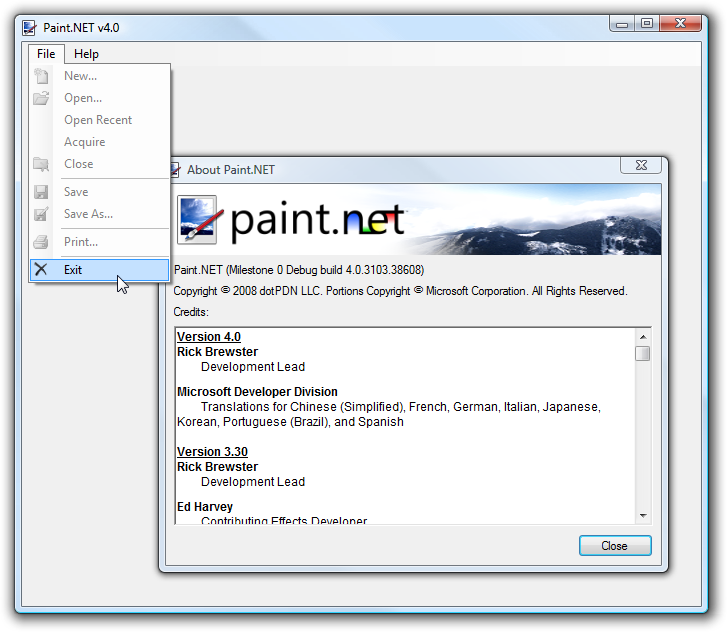
The Second Paint.NET v4 Screenshot

Like I said before, the first concrete work I’m doing for Paint.NET v4 is focused on the installer and updater. A lot of people have told me that they use Paint.NET infrequently, or that when they start it up they "just want to get something done really quickly." Updates really get in the way of that, and people are starting to get used to Firefox’s ability to install an update after you’ve finished your current session. As a result, many people are still sitting on old versions of Paint.NET. Bummer 😦

Paint.NET v4 will support this:

I’m choosing to not have a "cancel" or "do not install" button in order to better encourage (trick?) people into installing the update. However, it’s still possible to skip out on installing the update … just click the ‘X’ in the top right corner.

The wording and graphics are still first draft. I’ll probably want a separate button icon for each of them.

Unfortunately this all won’t be available until v4 ships … which means that a v3.xx -> v4 upgrade, which requires the installation of .NET 3.5 SP1 in many cases, cannot benefit from the more casual "install once I exit" option.

On another note, the "Optimizing performance for your system…" portion of installing, which uses ‘ngen.exe’ to precompile Paint.NET, is much faster now with .NET 3.5 SP1. I’ve also made the installer report real progress on this operation instead of using the "marquee" or "indefinite" mode.

Another thing I’m doing is implementing features in an order such that I could potentially ship a Paint.NET v3.50 from this codebase if I decided it was necessary. It might be a good idea to get .NET 3.5 SP1 installed on everyone’s systems sooner rather than later!

Paint.NET v4 takes a new, good turn (ixnay on the rewrite)

In my last post about Paint.NET v4, I said that I was going to be writing it "from scratch" — that it would be a rewrite from the ground up, in other words. I’ve since changed my mind.

You see, I got a few months into this rewrite project. I wrote a lot of code — 26,000 lines of it, in fact. However, the continually daunting task of finishing the next 150,000 lines of code and doing a reset on the 4 years of bug fixes in v3.xx made things … depressing. So, I’ve decided that I will turn back to the v3.xx codebase and work towards v4 from there.

However, don’t worry. The rewrite project, which is now called a "prototype," was not wasted time. I was able to work on and experiment with a lot of stuff in a nicely isolated fashion, and I now have a much better idea how I can refactor these into the existing [v3.xx] codebase. This includes some things for stuff like task management, extensibility, eventing, asynchronous programming, retained mode rendering, and an improved document model. This is actually a good example of quantity beating quality: by being able to iterate on all this enormous amount of code in isolation without the burden of the existing code base, I’ve been able to fine-tune it towards perfection.

In fact, I can’t stress that one word enough: depressing. Having 150,000 lines of code worth of work to do before you can even have something that’s feature parity with your already-shipping product, and that your users will even be interested in, is not fun. Next time you hear yourself thinking, "Rewriting this would be worth it," stop and switch over to thinking about prototyping in an isolated codebase instead of rewriting the existing codebase. I can write a lot of code really fast, and I like to think I’m very good at it, but this was just too much for me. Your code (and mine) may not be academic-proof or astronaut-quality, but that’s ok … because it already works.

Now, why don’t I talk some about version 4 itself and what’s happening.

The first features that I’ve been working on are focused on the installer and the updater. First, the installer will internalize the progress bar stuff — it will no longer have those annoying "child windows" for when it is installing things. For the update process, I am going to give a nod to Firefox and how it lets you install the update once the current session is complete. This is in response to a lot of feedback I’ve been getting from people who never install updates because they just want to get something done right now, and can’t be bothered to wait a few minutes for the update. It’s completely understandable — I do it myself. Changes to the installation and update code are always risky business, and as such I had been delaying these until I had a long, full test pass available (in other words, a major version update). And, to explain why they are risky business: if the installer or updater fails, then the user can’t use the product. Statistically speaking, they have disappeared from your userbase. They are gone. If your installer and updater work, then your Priority 0 feature is always making sure that it continues to work!

Oh, also, the installer will do a much better job of getting the .NET Framework installed if it isn’t there already. I’m taking advantage of the new Client Profile that’s available with .NET 3.5 SP1, and it rocks: it’s only about 300KB to include the bootstrapper!

This change of direction shouldn’t result in any lost or cut features. If anything it will dramatically shorten my schedule for v4. This is good news.

And in other news, expect a version 3.36 update once the Olympics are done. It will be a servicing release to fix some bugs, like the canvas background color one. I’ve settle on #c0c0c0, which is what Photoshop uses.

Paint.NET 3.35 … "ugly" canvas background?

In the latest update, I changed the canvas background in Paint.NET so that it was a solid color instead of a grey gradient. The rationale for this change was based on a comment made by forum member "mkidd":

"The top-to-bottom grayscale gradient on the desktop area of Paint .NET (3.30 in my specific case) can cause serious toning misjudgments. I didn’t fully appreciate this until a colleague pointed out how much it was throwing him off, i.e. printed results didn’t seem to match on-screen results due to improper relative corrections applied to the top and bottom areas of images, say sky vs. ground. It seems that the plain uniform gray background in Photoshop is actually pretty important."

I agreed. So, I changed it to a solid color and got rid of the gradient. The color I used is based on a system color — in fact, it’s a 50% blend between SystemColors.Control and SystemColors.ControlDark. This produces mostly good results, but apparently there are some custom color schemes where it looks downright awful. The first person to really express a passionate opinion about this was Jelle Mees (forum name), who wrote a forum post about it, and included a screenshot:

In Vista, I think it looks pretty good:


Here is how it looks in XP with the Luna / Olive Green theme:

Similarly, I think it looks fine in the other built-in XP themes, especially "Classic". I was trying to honor the system color choices, but a few other forum members have expressed a very strong opinion that the canvas background should be a static (or configurable) color that is not based on the system theme.

It got me to thinking, and I realized that I didn’t fully parse the original statement about the gradient versus a plain gray background. In fact, I’m now convinced that basing the canvas background on a system color is a bad thing. The reason for this has to do with color calibration between systems: if the canvas background is grey on one system, but off-white/yellow on another, then it could throw off a person’s perceptions of colors between the systems. Or, two different people on two separate but differently configured systems would perceive colors differently (all else being equal of course, such as the monitors’ color reproduction). Gray is a neutral color, and won’t have much of a radiosity effect than colors with hue.

Well, what do you think? Is the new canvas background in 3.35 ugly? Would you rather it be a solid gray on all systems regardless of theme, such as in the Vista screenshot above?

In the forum post mentioned above, I have made a available a replacement PaintDotNet.Core.dll that sets the canvas background to #c6c6c6 regardless of the system theme. If you’d like, you can try it out before commenting! That DLL will not work in future versions of Paint.NET, however.

Paint.NET v3.35 final release now available!

This version has a new Posterize adjustment, Intersect selection mode, and dramatically faster selection editing performance (add, subtract, intersect). Oh, and the usual crop of miscellaneous bug fixes, of course!

You can get this update by using the built-in updater (Help menu -> “Check for Updates”), or by downloading it from the website at http://www.getpaint.net/ . The update process is very automated, so you won’t need to worry about uninstalling your old version or anything — it’s all taken care of for you.

Changes:

· New: Posterize adjustment, by Ed Harvey.
· New: Intersect selection editing mode.
· Improved: Dramatically improved selection editing performance for the Add and Subtract modes (and also for Intersect). The performance used to be dependent on image size, and thus was often unusable on images larger than 1024×768 pixels. It is now dependent only on selection complexity (number of polygon edges) — the improvement is generally between 3x and 1000x.
· New: When holding Ctrl or Alt for a selection tool, the cursor now has a plus or minus indicator.
· Changed: The canvas background is now a solid color instead of a gradient. The gradient was causing certain tone misjudgments related to bright versus dark colors.
· Changed: Shortcut key for Sepia is now Ctrl+Shift+E. The shortcut for Posterize is now Ctrl+Shift+P.
· Changed: Hotkeys for selection modes are now Left click for Replace, Control+Left click for Add (union), Alt+Left click for Subtract (difference), Alt+Right click for Intersect, and Ctrl+Right click for Invert (xor).
· Changed: When using a selection mode other than “replace”, it will now draw the selection outline so that you can see both the original and resulting selection areas. Before, it would only draw the resulting selection area outline, which made modes such as Intersect hard to use.
· Fixed: The Resize dialog had some rounding errors with the “Maintain aspect ratio” feature, which caused a few discrepancies and even a spurious “out of memory” error.
· Fixed: Some quirks with the Color Wheel control for IndirectUI-based effect plugins.
· Fixed: Several miscellaneous and rare crashes.
· Fixed: The installer would display a bizarre error if a “blank” install folder was attempted.
· Fixed: The installer now only accepts absolute path locations, instead of relative ones. This fixes an ambiguity between where Paint.NET believes it is installing itself to, and the directory that Windows Installer actually uses.
· Fixed: Sometimes pasting would result in a crash when certain types of malfored data were on the clipboard.
· Fixed: It was possible to get around some of the protections imposed by the IndirectUI system. This was causing instability with some effect plugins such as “Fern Fractal”.
· Fixed: There were some issues with the implementation of “linked” sliders for effects based on IndirectUI.

Enjoy!

C# Extension Methods … Portability Aid?

In my first post about Paint.NET v4, I mentioned that I was learning a lot about C# 3.0 and .NET 3.5. One of the things I’m absolutely falling head-over-heels for is extension methods.

One use of these is to add utility functionality on to existing classes that you don’t own the implementation for. As an example, consider the System.Uri class. In my opinion, it could use an Append method:

public static class UriExtensions
{
    public static Uri Append(this Uri baseUri, string relativePath)
    {
        return new Uri(baseUri, relativePath);
    }
}

You can then use code such as this:

Uri donateUri = new Uri("http://www.getpaint.net").Append("/donate.html");

Instead of:

Uri donateUri = new Uri(new Uri("http://www.getpaint.net"), "/donate.html");

(Bear in mind that the string literals would probably be pulled out of a list of constants, and not inlined like in the code above.) In this case, we’re simply enabling a choice of coding style and not really doing anything new. We are avoiding pathological nesting such as "new Uri(new Uri(new Uri(…" for when we need to paste together multiple relative Uri paths.

One place I’m finding extensions methods to be very useful is in defining and implementing interfaces with only strictly orthogonal functionality. You don’t need to add utility methods to interfaces, you can simply define them as extension methods.

For example, my resource manager is contained in an IResourcesService interface that has GetString() and GetBinaryStream() methods. And that’s it.

using System.IO;

namespace PaintDotNet.Framework
{
    public interface IResourcesService
    {
        string GetString(string stringID);
        Stream GetBinaryStream(string streamID);
    }
}

All resources other than strings are stored as binary streams, such as icons, bitmaps, text files, etc. If you want to load a bitmap, then you can use the handy extension method:

using System.Drawing; // pull in GDI+

namespace PaintDotNet.WinForms
{
    public static class ResourcesServiceExtensions
    {
        public static Bitmap GetBitmap(this IResourcesService resources, string streamID)
        {
            return new Bitmap(resources.GetBinaryStream(streamID));
        }

        // similarly for GetIcon, GetCursor, etc.
    }
}

… elsewhere in the code …

menuItem.Image = Resources.GetBitmap("Icons.MenuFileExitIcon.png");
    // Resources is a local property that gets the IResourcesService assigned to us

I could have multiple implementations of IResourcesService. For example, I could have the "normal" implementation that pulls from the local file system, then a test version that does all sorts of fakery, and then maybe experiment with one that loads all my resources via HTTP GET. But, I only ever need one implementation of GetBitmap() because it is just a helper method sitting on top of GetBinaryStream().

But wait, there’s more!

GetBitmap() returns a reference to a System.Drawing.Bitmap object. You generally only care about this type if you’re writing a WinForms application (which I am doing). Or, put another way, you wouldn’t want an object of this type if you were writing a WPF application. You’d want a BitmapSource or something. I am not writing a WPF version of Paint.NET v4, but one of my goals is to have the ability to write one. This is where the "separation of UI and logic" comes into play from my previous post. I refer to the WinForms UI as the shell. The "business logic" portion of the code base is referred to as the application (app for short). You could potentially have a WPF shell, or a command-line shell. Or you could write your own UI toolkit that P/Invokes straight to the Win32 API and bypasses WinForms completely (I believe the latest Zune UI does this).

So, if we wanted a WPF shell for Paint.NET, we could still use the same interface and implementation for IResourcesService. No changes needed anywhere. Why should the resource loader care about what UI you’re using? Its job is to give you strings and binary streams. It’s your job to parse them. It shouldn’t need a reference to the likes of System.Drawing.dll or PresentationCore.dll.

Thus, we’d probably find the following extension method setup useful in our hypothetical WPF shell:

using System.Windows.Media.Imaging;
namespace PaintDotNet.Wpf
{
    public static class ResourcesServiceExtensions
    {
        public static BitmapSource GetBitmapSource(this IResourcesService resources, string streamID)
        {
            return …; // not sure what code goes here exactly 🙂
        }
    }
}

The WPF-based shell would never pull in the PaintDotNet.WinForms namespace, and would instead use the PaintDotNet.Wpf namespace. They’d almost certainly be in separate DLL’s. So these two static extension classes will never collide, even if they have similarly named methods.

Using extension methods this way is probably preferable to "interface inheritance" for adding utility methods. For example, now I don’t need to declare a IWinFormsResourceService that derives from IResourcesService. I can avoid putting all the utility functionality into the base interface which could cause headaches.

As another example of only implementing "strictly orthogonal functionality", consider the case of the System.Windows.Threading.Dispatcher class and its CheckAccesss() and VerifyAccess() methods. The latter basically calls the former and converts true/false into return/throw. It could be done as an extension method. In fact, I have my own IDispatcher interface in Paint.NET v4, and this is exactly what I do. For sections of my code that are P/Invoke heavy, I’ve found it useful to have a SizeOf() method attached to any struct, as opposed to calling Marshal.SizeOf(Type). Less keystrokes, and I think it improves readability.

Yet Another Poorly Done Business Proposal

I can’t make these things up, folks. I honestly feel that if someone really wants to do business with you, they’ll at least do more than 3 seconds of research and get your product’s name correct. It should be easy to figure out that the product hosted at http://www.getpaint.net/ is called Paint.NET, and not "Get Paint." The logo is only emblazoned at the top of every page…

Hello,

Our company, Firstlook, is currently seeking partners to distribute our latest software product, SearchInOneStep.com.

With 10 million active users of search software and a stellar record in the search industry, we feel we would be a great match with Get Paint.

Get Paint attracts a large number of downloads, with which our software could be easily bundled during install to provide an alternate steady source of risk free revenue  which goes directly to your bottom line.

We offer our bundling partners the option to be paid per download and would be open to any volume of downloads that your company could provide.

Please feel free to contact me at your earliest convenience if you are interested in monetizing your downloads with Search in One step.  I look forward to discussing this matter with you further.

Thank you,

Sanjay

Well, Sanjay, my product is not called "Get Paint". I went to the website and tried the "search in one step" and it’s garbage. All it does is syndicate a bunch of ads. There aren’t even any search results! So I told Sanjay that I would not be doing business with him.

As for everyone else, if you want a good search engine for Paint.NET stuff, might I recommend http://searchpaint.net instead? 🙂

The very first Paint.NET v4.0 screenshot!

It’s really not as exciting as it sounds unfortunately 🙂 I’ve been quiet on the subject for some time, though, and wanted to put out some information.

For a long time I debated whether I should fully refactor Paint.NET, or do it from scratch. I finally decided on the latter, and have finally been able to make some progress. Bear in mind that "from scratch" means that I started with a brand new, empty solution file in Visual Studio. It does not mean I’m throwing out all the current Paint.NET code. There are many places where I will be able to reuse vast amounts of it — rendering kernels, effects, math, algorithms, etc. The entire structure of the program will be different, however. If you demolish your old house to build a new one, you don’t throw out the grand piano in the living room too. It still has plenty of value.

The screenshot above is from a build that so far contains about 12,000 lines of code. This sounds like an exorbitant amount for a few menus and an About dialog, but hear me out. I’m building it using Inversion-of-Control (IoC) and related patterns, which requires a lot of new decisions to be made regarding assembly layout (layering, essentially). I’ve also got a new system for asynchronous programming, separation of UI and logic, separation of "contract" and "implementation" assemblies (this becomes very important when plugins come into play), command routing and handling, etc. Along the way I’m learning more about .NET 3.5 and C# 3.0, and have come across some wickedly cool things that are now possible.

As far as possible, everything is lazy initialized or loaded in Paint.NET v4. To aid this, I have a new asynchronous programming model and exception handling pattern, which I could probably talk about for hours. For example, in the screenshot above, the icons for the menu items are not loaded until you click on the menu — in fact, they are loaded using background threads (the threadpool). The graphics and rich text that populate the About dialog are also loaded from the resource manager service using a background thread. For these specific cases, there are no major performance requirements that necessitate this; however, it’s much easier to solve these simple cases and to establish good patterns for later, than the reverse. I’ve also got an old Pentium 4 that I now have available for baseline performance testing, and it will be interesting to see if I can keep the program as responsive on that system as on my Core 2 Quad — even if rendering kernels take longer to complete, it should still always immediately respond to input. *crosses fingers* (Anyone else get sick of Safari on iPhone not being responsive while loading some web pages? Yeah.)

Also, in the screenshot you may notice that the mouse cursor is resting in the File menu even though the About dialog is open. In Paint.NET 3, all dialogs are modal and you can’t do anything with the rest of the program while one is open. In Paint.NET 4, I’m trying to remove this as much as possible and as far as it makes sense to. For example, why should an update download prevent you from using the rest of the program? Why can’t you switch from image 1 to image 2 while a compute-intensive (aka, "takes a long time") effect is rendering on image 1? Why can’t you interact with the canvas while an effect dialog is open? Or change the selected colors?

Anyway, that’s all for now. I estimate that Paint.NET v4 will be 200,000 lines-of-code when it is done, which places me at about 6% complete.

Paint.NET v3.35 – Beta 2 is now available

This is a refresh of the beta with some good changes to the new features, and many bug fixes.

Please note that this is a beta, and expires in August. You can get it by downloading it from the website, http://www.getpaint.net/ (no need to uninstall your current version, it will figure it all out for you), or via the built-in updater. For the latter, go to Help -> Check for Updates… and make sure you are set up to receive betas by clicking on the Options button and ensuring that “Also check for beta releases” is checked. Then close the dialogs and click on Help -> Check for Updates… again.

Ok now that this is done I can get back to working on my blog posts about Fluent Exception Handling 🙂

Changes since Beta 1:

· Changed: When using a selection mode other than “replace”, it will now draw the selection outline so that you can see both the original and resulting selection areas. Before, it would only draw the resulting selection area outline, which made modes such as Intersect hard to use.
· Changed: The canvas background is now a solid color instead of a gradient. The gradient was causing certain tone misjudgments related to bright versus dark colors.
· Changed: Shortcut key for Sepia is now Ctrl+Shift+E. The shortcut for Posterize is now Ctrl+Shift+P.
· New: When holding Ctrl or Alt for a selection tool, the cursor now has a plus or minus indicator.
· Fixed: The Resize dialog had some rounding errors with the “Maintain aspect ratio” feature, which caused a few discrepancies and even a spurious “out of memory” error.
· Fixed: Some quirks with the Color Wheel control for IndirectUI-based effect plugins.
· Fixed: Several miscellaneous and rare crashes.
· Fixed: The installer would display a bizarre error if a “blank” install folder was attempted.
· Fixed: The installer now only accepts absolute path locations, instead of relative ones. This fixes an ambiguity between where Paint.NET believes it is installing itself to, and the directory that Windows Installer actually uses.

Paint.NET v3.35 BETA is now available

Alright, here we go again 🙂 This releases introduces a new Posterize adjustment, a new Intersect selection mode, and dramatically improved performance for selection editing.

Please note that this is a beta, and expires in August. You can get this by downloading it from the website, http://www.getpaint.net/ (no need to uninstall your current version, it will figure it all out for you), or via the built-in updater. For the latter, go to Help -> Check for Updates… and make sure you are set up to receive betas by clicking on the Options button and ensuring that “Also check for beta releases” is checked. Then close the dialogs and click on Help -> Check for Updates… again.

Enjoy!

* New: Posterize adjustment, by Ed Harvey.
* New: Intersect selection mode.
* Improved: Dramatically improved selection editing performance for the Add and Subtract modes (and also for Intersect). The performance used to be dependent on image size, and thus was often unusable on images larger than 1024×768 pixels. It is now dependent only on selection complexity (number of polygon edges) — the improvement is generally between 3x and 1000x.
* Changed: Hotkeys for selection modes are now Left click for Replace, Control+Left click for Add (union), Alt+Left click for Subtract (difference), Alt+Left click for Intersect, and Ctrl+Right click for Invert (xor).
* Fixed: Sometimes pasting would result in a crash when certain types of malfored data were on the clipboard.
* Fixed: It was possible to get around some of the protections imposed by the IndirectUI system. This was causing instability with some plugins.
* Fixed: There were some issues with the implementation of “linked” sliders in IndirectUI.

What's coming in Paint.NET v3.35

This next update to Paint.NET will fix the usual set of small bugs, introduce a new adjustment (Posterize), fix a major performance blemish related to selections, and add an Intersect selection mode.

As for the small bug fixes, turns out there’s the possibility that Paint.NET will crash if malformed data is in the clipboard from, of all things, certain WPF-based applications. For effects that use IndirectUI, there was a problem with "linked" sliders (using LinkValuesBasedOnBooleanRule). And, it was possible to get around some of the protections that IndirectUI put up to protect Paint.NET from certain types of plugin code. Currently this only seems to affect the Fern Fractal plugin. I’ve e-mailed the author and helped him to find a way to accomplish what he wanted without "breaking the rules," so to speak.

Posterize is an adjustment written by Ed Harvey. It allows you to restrict each of the red, green, and blue channels to only have between 2 to 64 discreet values. Normally each channel has up to 256 values … 0 through 255, which is the range for a byte. This can be useful to give your image a "faux-dithered" look, although of course there are many other creative ways to use it.

Selection performance has been a major sore point in Paint.NET over the last 3 years or so. The initial drawing of a selection is fine — it’s when you go to use union (add) or difference (subtract) combination modes that things get froggy. Really froggy. As in slow. Pathetically slow.

We’ve been using a very brute force algorithm that converts the selection to a bit-mask, then performs the boolean operations on each bit, and then traces the bitmask to recreate a selection path (selections in Paint.NET are stored as a a polygon list). This causes these operations to have performance that is proportional to the number of pixels in the area where the selection is located (its bounding rectangle, actually). On a large or even medium-sized image, these are immediately prohibitve to use. This algorithm was originally developed for use by the Magic Wand tool so that we could do per-pixel tolerance, and then convert back to the polygon representation that was required everywhere else in the application.

There are algorithms that have been developed with let you do boolean algebra operations on the polygons themselves, optimizing away this very hacky (albeit correct!) way of doing things. One such algorithm is detailed in a 1992 paper by Bala R. Vatti titled, "A Generic Solution to Polygon Clipping." This is the algorithm implemented in the GPC (General Polygon Clipper) library written by Alan Murta from the Computer Science department at the University of Manchester in England. There are other algorithms that have been developed since, such as the one described in a 1998 paper by Günther Greiner and Kai Hormann titled, "Efficient Clipping of Arbitrary Polygons".

I have read both papers and tried to implement both of the algorithms. I have tried this several times, and have come close to completion but never quite made the leap to full comprehension, nor a finished implementation. I never had more than an evening or two in a row to devote to this pursuit — by my estimate, I would need at least a full two or three weeks. Maybe even a full month. These papers are from the academic world, and I haven’t had much practice there for quite some time! As such, the papers are very dense (in a good way) and require many readthroughs to fully understand.

I was never able to find a good implementation of the second algorithm by Grenier and Hormann, which was desirable because it was simpler and supposedly more efficient. In the end, GPC by Alan Murta won out: like previously mentioned, it is an implementation of Vatti’s algorithm, in C. It has been around for quite awhile and has needed no major revisions in many years. So, from an integrator’s standpoint (me!), it is the simplest and safest solution. I am happy to say that I have just purchased a Commercial Use license from the University of Manchester and that the next update to Paint.NET will be using it to substantially increase performance for selections!

This is a simple case of pragmatism versus idealism: ideally, I would have the time, the patience, and the mental acuity to implement these. In practice, it would take so long to do this myself that the cost of a Commercial Use License is actually the cheaper alternative. So for everyone who has donated to Paint.NET, this is how I’m using your money 🙂 This does affect anyone interested in using the Paint.NET source code for their own commercial purposes: if you need any of the code related to selection stuff, you will have to purchase your own Commercial Use License from the University of Manchester.

The only way to get a feel for the performance increase is to cheat a little, with the current version of Paint.NET. Boot it up and create a 1024×768 image. Now, draw a circle selection that encompasses the whole image. Next, go to the toolbar and where it says "Selection Mode:", click on the down-arrow and choose "Subtract." Next, Draw another circle that is inside of the one you just draw. It’s very very slow. Next, undo this foolish thing you just did. Set the "Selection Mode:" to be "Invert (xor)" (this is the one mode that GDI+ gives you for free!). Now draw that second circle again and notice how smooth everything is. In the next update, this performance will also be there for Add (Union) and Subtract! The usability improvement is real and honest, and I think everyone will really like it.

Next, I’ve decided to add an Intersect selection mode. I’m not sure why I never did this before, to be honest. It was trivial to do, especially since GPC supports it right out of the box. Many other drawing programs offer this — it simply makes sure that the result of combining two selections is the area in which they overlap.

Last, I’m reassigning the keyboard shortcuts for the selection modes. Before, you would hold Control for Add/union, hold the right mouse button for Subtract/difference, and Control+Right for Invert/Xor. These are kind of weird, and non-standard, and plus I needed a key for Intersect. So, in the next update the shortcuts will be Control for Add/union, Alt for Subtract/difference, Control+Right mouse button for Invert/Xor, and Alt+Right mouse button for Intersect.

I’m hoping to have a beta of v3.35 out within a few weeks, and the final release in early-to-mid July.