Paint.NET 4.0 build 4158 screenshot

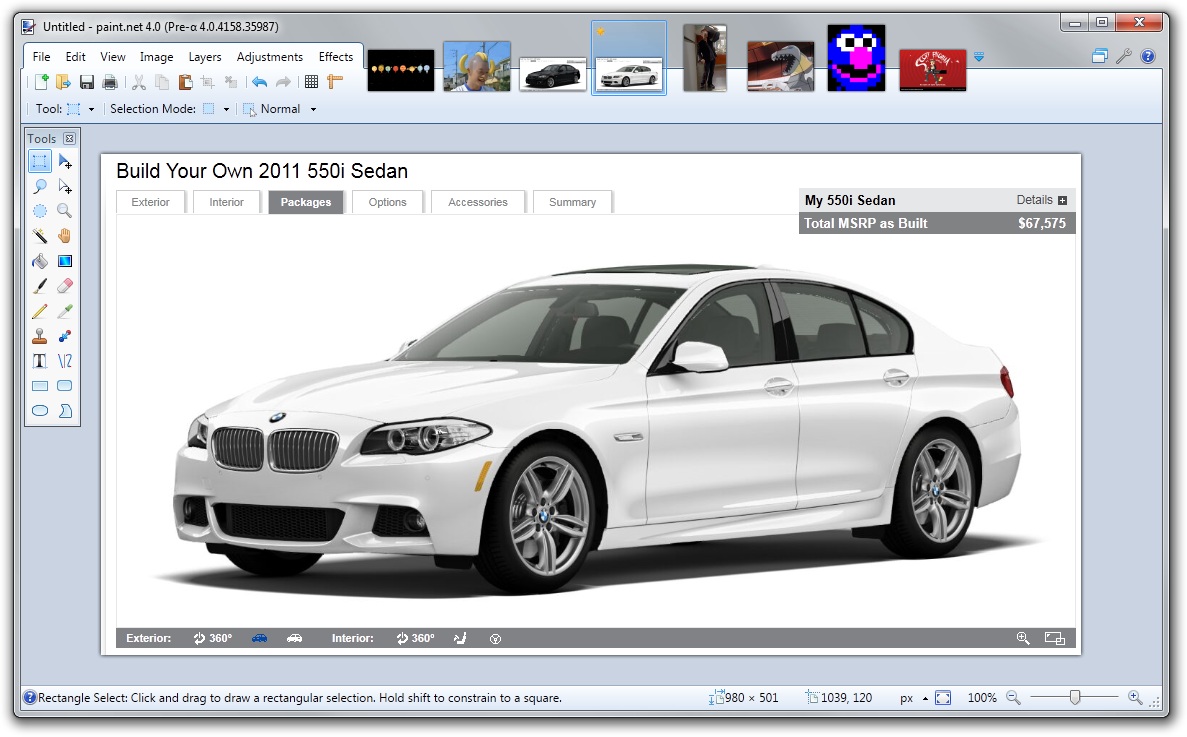
Here’s a screenshot (click for full size):

A summary of the changes so far:

  1. Window, Utilities, and Help menus are now button menus in the top-right corner. They are still menus, and behave as such (as in, they are not some weird custom button control).
  2. The floating tool window now use a more compact, glass-less styling.
  3. The image list has been “pulled up” into the title bar area. This has several advantages. First, if follows the Fitts-Law-friendly convention that Firefox and Chrome have employed whereby the tabs are docked to the top edge of the screen when the window is maximized (the title area is always draggable, for all of us Aero Snap fans). This ensures that the image list does not get “shoved around” when a tool needs more horizontal area (such as the Text tool). And, it ensures more horizontal space for toolbar controls (which will become important later!). 
  4. The zoom and controls have moved to the status bar area, and use a slider instead of a text combo box. It works much like the one in Windows Live Photo Gallery. The units selector has also moved to the status bar.
  5. “Paint.NET” is now “paint.net.”

Some things probably not apparent in the static screenshot:

  1. The image list supports drag-and-drop reordering. The dragging is live (I don’t employ an “insertion arrow” ala Firefox), and sports the same types of reshuffling animations you see in the Windows 7 task bar. Fade in animations are also used when opening or creating an image.
  2. Speaking of Windows 7, each image shows up in the task bar thumbnail list. If you hover over the Paint.NET icon, you’ll see a list of images instead of just 1 thumbnail for the main window. This can be disabled in Settings, just like in Firefox, at which point you’ll get 1 tab for the main window instead of 1 per image.

These are just some of the cosmetic changes. There are, of course, many other little and not-to-little changes.

Paint.NET 4.0 will not support Windows Vista

I’m announcing this now so that everyone has plenty of time to do whatever. I’ve already said before that Paint.NET 4.0 will not work on Windows XP, but I’ve also recently decided to drop Vista as well. The minimum OS will be Windows 7, and it will not work at all on Vista or XP.

Now you know.

… puts on flame-retardant clothing …

Using Lazy<T> to Solve Deadlocks in Resource Caches

Multithreaded code is easy. And very hard. It’s easy when you learn a few patterns and perfect your use of them. And then it’s wickedly difficult anytime you get confident and stray outside of those bounds and try to do something awesome. This seems to happen a few times per year.

I recently had a deadlock in my Paint.NET 4.0 code that I’m still untangling*. I have a custom interop layer for handling Direct2D, DirectWrite, UI Animation Manager, and Windows Imaging Component. There are 3 systems that constantly headbutt into each other:

  1. RCW caching. “RCW” stands for Runtime Callable Wrapper, where “runtime” refers to “.NET Runtime.” These is a managed object that holds onto a COM object reference, and provides proxy methods and properties. Whenever a COM object passes over into .NET land, a wrapper must be created. However, in order to maintain object identity, you need to cache these. This way, you can use Object.ReferenceEquals(a, b) to see if ‘a’ and ‘b’ refer to the same COM object. This RCW cache became especially important when I added support for the UI Animation Manager. It raises a lot of events, and you need to be able to know which object is raising the event in order to determine what to do. That isn’t possible if every ‘sender’ object is a brand new RCW.
  2. Deferred resource initialization and caching. In Direct2D, when you create a “solid color brush” (for example), you’re allocating a resource on a specific render target. You can think of this as a “physical” resource. However, managing the lifetime of these can get a bit tedious. You have two choices. The first is to create the resource, draw with it, and then immediately delete it. This results in simple, clear code, but it’s not very good for performance. So, you want to reuse these resources across your OnPaint() calls, and you need to dispose them whenever the render target needs to be recreated. This isn’t difficult, but multiplied across a lot of code, you end up with a lot of bug hazards. So, I came up with a system whereby I can just create a brush descriptor, which implements the same ISolidColorBrush managed interface, and pass it to the same methods on the Direct2D render target wrapper which take “physical” resources. Before the real drawing calls are invoked (e.g., ID2D1RenderTarget::FillRectangle(brush, rect)), it first checks to see if it’s a deferred resource and whether the physical counterpoint is in the cache.
  3. Change notification for deferred resources. Some deferred resources must encapsulate other deferred resources. For instance, a LinearGradientBrush contains a GradientStopCollection. In my deferred resource system you can make changes to the deferred resource (“Color” has a property setter, etc.), whereas the hardware resources are read-only (as per Direct2D’s definition). When you make a change to a GradientStopCollection, it invalidates itself and must also cause its containing LinearGradientBrush (if any) to be invalidated. In order to simplify object lifetime management and avoid memory leaks, this uses resource IDs and weak references. These events go through an event router, e.g. “I’m resource #15, please send a NotifyChanged event to my subscribers.” as well as, “I’m resource #16 and I want to know whenever resource #15 is changed or disposed.” The router then has a list of weak references to resources which it notifies.

All of these caches use reader/writer locks. Usually a resource has already been created, so we can just grab the read lock and be done with it. The problem I ran into, once I started to use Direct2D across multiple threads, was that my “GetPhysicalResource” method in the resource cache looked something like this:

private ReaderWriterLockSlim rwLock;
private Dictionary<ResourceDescriptor, Resource> cache;

Resource GetPhysicalResource(ResourceDescriptor key)
{
    this.rwLock.EnterReadLock();

    try
    {
        Resource resource;
        if (this.cache.TryGetValue(key, out resource))
            return resource;
    }

    finally
    {
        this.rwLock.ExitReadLock();
    }

    this.rwLock.EnterWriteLock();

    try
    {
        Resource resource;
        if (this.cache.TryGetValue(key, out resource))
            return resource;
        else
        {
            resource = key.CreatePhysicalResource(this); // ruh roh
            this.cache.Add(key, resource);
            return resource;
        }
    }
   
    finally
    {
        this.rwLock.ExitWriteLock();
    }
}

I’ve highlighted the problematic piece of code (well, I tried to). The reason this line of code is bad is because it’s invoking a callback method while holding a lock (it’s a virtual method). The method it’s calling may need to create RCWs, or create other physical resources, etc. in order to finish the request. When this is happening on multiple threads we wind up with these 3 systems all trying to enter various locks in various orders. Woops. And, I might add, duh.

It took me awhile to figure out what was going on, and it was a face palm moment when I finally did: I had just committed a Multithreading 101 fallacy. It was just a simple deadlock, and nothing nefarious such as a bug in ReaderWriterLockSlim, or a solar flare, or a glitch hiding somewhere in ~250,000 lines of code. Nope, it was right there, plain as day, and easy to understand. Sometimes it really is the simplest answer possible. It’s like the guy who can’t get his car to start, and is trying and trying and trying, but he just can’t get it to start and can’t figure out why. Then his 8-year old daughter comes outside and says something simple like, “Maybe it’s out of gas!” And it is. Derp de derp.

Clearly, we don’t want to invoke the callback method while holding the lock. But, we must update the cache! Tossing ‘null’ in there as a placeholder isn’t really going to work well, as we’ll just have 2 problems at that point (lots of extra synchronization, and messy error handling).

.NET 4.0 introduces a class called Lazy<T>. You give it a Func<T> in the constructor, and it provides a Value property for you to retrieve the result of executing that delegate. However, it won’t execute the delegate until the Value property’s getter is called for the first time.

Let’s use it:

private ReaderWriterLockSlim rwLock;
private Dictionary<ResourceDescriptor, Lazy<Resource>> cache;

Resource GetPhysicalResource(ResourceDescriptor key)
{
    this.rwLock.EnterReadLock();

    Lazy<Resource> lazyResource;
    try
    {
        this.cache.TryGetValue(key, out lazyResource);
    }

    finally
    {
        this.rwLock.ExitReadLock();
    }

    if (lazyResource != null)
        return lazyResource.Value;

    this.rwLock.EnterWriteLock();

    try
    {
        if (!this.cache.TryGetValue(key, out lazyResource))
        {
            lazyResource = new Lazy<Resource>(() => key.CreatePhysicalResource(this)); // better!
            this.cache.Add(key, lazyResource);
        }
    }
   
    finally
    {
        this.rwLock.ExitWriteLock();
    }

    if (lazyResource!= null)
        return lazyResource.Value;
}

This solves the problem. Locks are only used when working with the cache itself, and never while doing other work. The callback is always called outside of holding a lock, and there’s no hijinks involved in checking to see whether something is null (as a placeholder), and no need for complicated synchronization if you retrieve the resource from the Dictionary while it’s still being created by another thread (Lazy<T>.Value will block other threads). Error handling is also simple. If the value generator throws an exception, well then we’ll crash (ok ok, my error handling is actually a little more interesting than that – you don’t want a “broken” resource to remain in the cache, for instance.)

There is one bit of weirdness with this system. If thread 1 creates the Lazy<T> and adds it to the cache, it’s possible that thread 2 will retrieve it from the cache and use Lazy<T>.Value before thread 1 gets to it. So, you may end up with misattribution for an error in case your Func<T> throws an exception. However, this seems minor – all requests for the same resource descriptor can be treated as equivalent, so it really doesn’t matter which thread gets the exception. (Ok, I’m simplifying, because this depends heavily on context. I’ve made the executive decision to live with thread misattribution of exceptions instead of deadlocks.)

This code is, of course, abbreviated. I’m actually using a custom class I wrote called LazyResult<T, TArg> because I don’t want to allocate a new anonymous delegate every time I need to create a resource. It uses a Func<TArg, T> instead of a Func<T>, and you provide a TArg to its constructor. With this class I’m able to allocate one delegate per cache, and each LazyResult<T, TArg> takes that same delegate but with a different “TArg” (either the ResourceDescriptor for the resource cache, or a pointer to the COM object for the RCW cache). This cuts the object allocations in half. There is a bit more error handling involved, and I’m also using WeakReferences to LazyResult.

Anyway, I found this useful. Hopefully someone else will too.

* mostly because I haven’t had much time to work on it 😦

Paint.NET in 24 more languages?! tl;dr … Yes

tl;dr: Bing Translation + 500 lines of new code + my old ResXCheck project = Paint.NET now has its own Tower of Babel factory.

Currently, Paint.NET ships in 9 languages. Soon, that number may jump all the way up to 33*.

Earlier today I needed to figure out what some short phrase in Spanish meant because the 2 years I took in high school were completely lost to me. After I learned what the now-forgotten phrase meant, further curiosity took over and I thought, “Don’t they have an API for this? Hmm … maybe I can use it to translate Paint.NET. I really doubt it’ll be that easy though, but why not check it out.”

As some quick background, a group within Microsoft Developer Division had handled translation for about 4 years, spanning versions 3.0 through 3.5 of Paint.NET. It was a volunteer effort done in their precious free time, and the impact has been enormous. Once 3.5 was done, shifting priorities and responsibilities led us to amicably part ways, leaving me without their graciously offered translation abilities. This is the reason why all updates to 3.5 (currently up to 3.5.8) have had almost no changes to the string resources**. New features need new translations, and even new error messages need them. I was in a bit of bind: not only could I not add new features, but I couldn’t even improve error handling! My plan was to hire a translation agency to handle things for the release of 4.0, as it would be cost prohibitive to do incremental translation updates (let’s say ~10 words for every minor update, on average). Anyway, back to the main plot.

I found the API documentation for Bing Translation, signed up for an API Key or whatever they’re calling it nowadays, and started up a new C# command-line project in Visual Studio. I added a “service reference” to their SOAP API and it all magically fell into place with a simple, imperative .NET API. I could create a service object and send queries and get results. It even worked.

“This can’t be that easy. No way.” But it was. I already had a paragraph of code to parse out a RESX file into a key/value pair list (no really, it’s a paragraph of LINQ-to-XML: check out the method “FromResX” from my old ResXCheck project), so I was already halfway there (so to speak).

I didn’t want to retranslate everything that I already had; human translation is usually better than machine translation. So the first requirement was to support incremental translation. This necessitated the ability to specify the source ResX file (English in my case), the previous version of the source ResX, and the latest translation of the source ResX for a given language. With this it’s a few simple LINQ queries and set algebra to determine which strings are new, which are changed, and which ones already have translations (provided they are neither new nor changed). The bulk of the code is devoted to keeping count of these and printing it to the console, for funsies.

As another quick backgrounder for those who haven’t worked with localization: string resources are specified as a name and a value. In code, you use the name in order to lookup the localized text, e.g. Resources.GetString(“MainWindow.FileMenu.Text”) which nets you “File” for English, or whatever is appropriate for the chosen language. It really is just a key/value dictionary and normal set algebra applies. Also, this is all stuffed into an XML file with the extension “resx.” Now you know.

The next hurdle was handling keyboard accelerators, which are specified in WinForms with an ampersand. For instance, the “File” menu’s name is stored as “&File” to indicate that F is the keyboard key you use to access it. This was done by figuring out what the accelerator was (String.IndexOf), removing it, and then adding it back into the translated text. If the translated string had that character in it, then I used it (I inserted an ampsersand at the appropriate spot). Otherwise, I employed the convention of adding “ (&X)” to the string, where ‘X’ is the accelerator key (you see this, for instance, in Japanese translations.) This would be trivial to adopt for WPF which uses a single underscore instead of the ampersand, presumably because ampersands are obnoxious to type in XAML or something.

Another problem I ran into, comically enough, were blank strings. Bing doesn’t like to translate String.Empty, and Paint.NET has a few of those for enumeration values which don’t actually show up in the UI. They are present in the strings file because I have a utility class for handling enumeration value localization lookup, EnumLocalizer, and it requires all enumeration values to be accounted for. I was able to handle this with my own proprietary translation algorithm (hint: copy by value).

One hurdle I was expecting and dreading didn’t turn out to be a problem at all. If you’ve worked with localization in .NET then you know that many strings contain placeholders. For instance, “There are {0} files.” The goofy looking {0} is a placeholder for an integer in this case, e.g. “There are 23 files.” For some reason, and much to my pleasant surprise, these almost all survived translation. There were only 7 instances that required manual fixing: 3 for each of the Chinese variants, and 1 in another language where it goofed up a URL suffix. I highly doubt these were translated with perfect grammar, but I wasn’t really expecting that anyway. I can live with having to manage 7 fixups out of ~24,000 strings. (This also improves the case for wanting incremental translation: these fixups will survive the next time I update the translations, since it will only translate strings which are new or changed.)

The last hurdle was that the Bing API limits you to 50 requests per minute before it starts giving you a Denial-of-Service error. Throttling is easy enough with Thread.Sleep(), along with retry logic in case that doesn’t work.

At this point it took 23 minutes to translate ~1000 strings from English to any other language. Since 8 languages are already done, that gives a running time of about ~9 hours. That’s a long time! Still, that’s much shorter and much cheaper than human translation, so it would’ve still counted as success for me. Fortunately, Bing Translation provides a method overload for doing a batch query, so I was able to knock the time down to about 23 seconds. Yes, seconds. Per language. ~9 minutes total. It would be even faster if the API (or protocol? I don’t know) wasn’t limited to a 64KB query string.

Along with ResXCheck, which lets me verify the structural correctness of a translation, I now have an almost completely automated method of bootstrapping a new language for Paint.NET. I currently have a small group of private testers checking out a beta version of what I’m tentatively calling the “Paint.NET Bing Translation Pack”. We’ve run into a few crashes, but these are the result of my goofy aforementioned EnumLocalizer class, and it will be easy enough to fix (although it will require a 3.5.9 release, eventually). If things go well then I’ll start to include them in the main release as-is, after which I can periodically collect proofreading fixes and incorporate them. It’s hardly perfect, but good enough for the usual “ship now and improve next week” cycle that we’ve all grown accustomed to.

This is one of those magical moments in software development where you write code for an hour or two, fueled only by a Red Bull (or 2***) and some new music, and are amazed that not only does it compile … but it works. At this point my main question is why I didn’t think of this sooner. You don’t often get this kind of bang for the buck.

I may even release this “BingTranslateResX” utility, complete with source code, on its own. Yes there are other automatic ResX translator apps out there, but I didn’t think to look until after I’d already written the code to my exact requirements. And, the ones that I found didn’t handle my need for incremental translation, which makes mine the only utility I know of that can work well in real, production projects. I think Paint.NET is a pretty good litmus test.

Hopefully now I can appease all the e-mails I’ve been getting with requests for Dutch and Czech translations.

* The diligent reader will note that Bing Translation currently supports 34 languages, and will reasonably ask “Why only 33?” The answer: the Thai translation goofs up all of the formatting codes, such as {0} and {1} placeholders, within the strings.

** The only change was to “XP SP2” and “Vista” in the installer’s error message stating the minimum system requirements. They were updated to “XP SP3” and “Vista SP1”. I handled that … all by myself!

*** or 3
Fix for: Paint.NET Text/Font crashes after installing Windows Update KB2505438

I’ve been getting numerous crash reports that Paint.NET’s text tool does not work, or that the font list only includes a few usable fonts. These are actually caused by the same thing, which is a recent Windows Update that went out affecting Direct2D and DirectWrite. The update in question is KB2505438, “Slow performance in applications that use the DirectWrite API on a computer that is running Windows 7 or Windows Server 2008 R2.”

The update contains a newer version of d2d1.dll (Direct2D) and dwrite.dll (DirectWrite), but for some reason only the newer version of d2d1.dll is being loaded by Paint.NET. I’m still trying to figure out why this is happening and what the ultimate fix should be, but in the meantime I have determined several different ways that you can fix this by yourself.

Windows 7 and Windows Server 2008 R2 are affected by this, both 32-bit x86 and 64-bit x64. Windows XP is not affected, since it only has GDI for text rendering. I have a report (see comments below) that this affects Windows Vista, and I also have a fix (see below).

Here’s the fix:

If you’re seeing this problem, you can choose from one of the following fixes, depending on which version of Windows you’re using:

Windows Vista or Windows Server 2008:

  1. Install the “Platform Update Supplement,” which you can get via Windows Update, or you can download it from Microsoft.
  2. or install Internet Explorer 9, which you can download from Microsoft. (I think it’s available via Windows Update, too.)

Windows 7 or Windows Server 2008 R2:

  1. Install Windows Update KB2454826, which you can get via Windows Update, or go download it from Microsoft.
  2. or uninstall the offending update, KB2505438. To do this, you should:
    1. Open the “Programs and Features” control panel.
    2. On the left pane of the window, click on the “View installed updates” link.
    3. Find the update titled “Update for Microsoft Windows (KB2505438)”. (you can type KB2505438 in the search box at the top right, which makes this much easier)
    4. Right click on it, and then click Uninstall.
  3. or install Service Pack 1 for Windows 7. This is something you can do with the Windows Update applet, or you can download it from Microsoft.
  4. or install Internet Explorer 9. You can also get this via Windows Update, or just go and download it from Microsoft. 

My personal preference is that everyone have the latest versions of everything, so I recommend both fix #3 and fix #4. However, if you can’t/won’t install SP1 or IE9, then the first option works just fine too. Windows 7 SP1 and Internet Explorer 9 both contain updated DLLs for Direct2D and DirectWrite which do not cause this problem.

The few usable fonts in this situation are all the bitmap fonts such as Courier and Fixedsys. These are rendered using GDI, not DirectWrite, so that is why they work.

I’m currently talking with some folks at Microsoft to figure out what else can be done so that a manual fix isn’t necessary. This may involve a new update to Paint.NET, or something else. (edit: new fixes have surfaced, see the new #1 for Win7 above, and the options for Vista users, also above)

If you’re interested, the forum thread discussing this is here: http://forums.getpaint.net/index.php?/topic/21240-paintnet-not-recognizing-fonts-crashing-text-tool/

Hope this helps.

Edit on 2011-03-24: Added details on KB2454826 for Windows 7/Server 2008 R2, and fixes for Windows Vista/Server 2008.

Paint.NET v3.5.8 is now available

As usual, you can either use the built-in updater from the Utilities menu, or you can download and install directly from the website: http://www.getpaint.net/. There’s no need to worry about removing the old version; that is all handled automatically.

This update fixes some issues with the fault-tolerant save functionality introduced in 3.5.7.

Oh, and I’d like to point out that even with these fixes, the original “mission” of fault-tolerant saving was being upheld. In previous versions, if errors or crashes happened while saving, the original file would be lost (honestly it’s a bit inexcusable that I waited so long to fix this!). In v3.5.7 it had some trouble saving the new contents in some situations, but the overall strategy was working because the original contents were still there. Since saving is such an important task to have working correctly, I’ve decided to roll out this update very quickly without attempting to roll in any other improvements.

Changes since v3.5.7:

  • Fixed: Saving to a folder that has been moved or renamed will display an error instead of crashing (regression from 3.5.6)
  • Fixed: Saving to a Sharepoint site will now work (regression from 3.5.6)
  • Fixed: Saving to a file that is marked as read only will now give an error instead of crashing (regression from 3.5.6)
  • Fixed: General reliability and correctness improvements to fault-tolerant saving

Enjoy!

Paint.NET v3.5.7 is now available

As usual, you can either use the built-in updater from the Utilities menu, or you can download and install directly from the website: http://www.getpaint.net/. There’s no need to worry about removing the old version; that is all handled automatically.

This update improves reliability of saving, further improves Copy/Paste functionality, and fixes some other miscellaneous bugs.

Here’s the list of changes since v3.5.6:

  • Saving an image is now fault-tolerant. If there is an error or crash while saving, the original file will be left alone.
  • Worked around a bug in some plugins that are incorrectly using the built-in Gaussian Blur effect. For example, Sharpen+. Now they won’t crash.
  • Fixed a bug with Edit->Paste into New Image, where the new image would be 1 pixel too wide or tall, as reported at http://forums.getpaint.net/index.php?/topic/20969-paste-problem/
  • Fixed a bug with the Rectangle Select tool and Fixed Ratio selection, which would be off by 1 pixel, as reported at http://forums.getpaint.net/index.php?/topic/20820-croppig-by-fixed-ratio-is-inexact
  • When pasting an image from Paint.NET into Paint.NET, it will be a little smarter about where it puts the image. Previously, if the location wasn’t within the viewport, it would be placed at the top-left corner of the viewport. Now it will find the nearest point along the edge of the viewport to place the image.
  • The EXIF rotation ("orientation") metadata is now discarded when opening an image, which was causing aggravation with images that could then never be reoriented correctly using Image->Rotate
  • The EXIF tags for JPEG thumbnail data are now correctly discarded.
  • Fixed a handful of memory leaks.
  • Fixed a typo in the Italian translation. In the setup wizard it was referring to "Pain.NET" (woops)

Enjoy!

Paint.NET v3.5.7 Beta (Build 4058) is now available

This update improves reliability of saving, further improves Copy/Paste functionality, and fixes some other miscellaneous bugs. I decided to port the “fault-tolerant save” work I did in the v4.0 codebase back to v3.5.x so that this much-needed reliability improvement could be made available now.

As usual, you can get it either by downloading it from the website, or via the built-in updater (Utilities -> Check for Updates). If you use the built-in updater, please make sure that "Also check for pre-release (beta) versions" is enabled.

You can also visit the forum to discuss this: http://forums.getpaint.net/index.php?/topic/21025-paintnet-v357-beta-build-4058/ 

  • Saving an image is now fault-tolerant. If there is an error or crash while saving, the original file will be left alone.
  • Worked around a bug in some plugins that are incorrectly using the built-in Gaussian Blur effect. For example, Sharpen+. Now they won’t crash.
  • Fixed a bug with Edit->Paste into New Image, where the new image would be 1 pixel too wide or tall, as reported at http://forums.getpaint.net/index.php?/topic/20969-paste-problem/
  • Fixed a bug with the Rectangle Select tool and Fixed Ratio selection, which would be off by 1 pixel, as reported at http://forums.getpaint.net/index.php?/topic/20820-croppig-by-fixed-ratio-is-inexact
  • When pasting an image from Paint.NET into Paint.NET, it will be a little smarter about where it puts the image. Previously, if the location wasn’t within the viewport, it would be placed at the top-left corner of the viewport. Now it will find the nearest point along the edge of the viewport to place the image.
  • The EXIF rotation ("orientation") metadata is now discarded when opening an image, which was causing aggravation with images that could then never be reoriented correctly using Image->Rotate
  • The EXIF tags for JPEG thumbnail data are now correctly discarded.
  • Fixed a potential memory leak in the Gaussian Blur effect.
  • Fixed a typo in the Italian translation. In the setup wizard it was referring to "Pain.NET" (woops)

Enjoy!

January 2011 usage statistics – Win7 wins

The last time I posted stats was in September, and Windows XP had finally dropped below the 50% mark. This time around, the identified trends are continuing: XP is down, Vista is down, Win7 is up, 64-bit is up. A new update, v3.5.6, was released in November, which brought some important bug fixes and also a few performance enhancements. The overall usage numbers (“total hits to update manifest”) cannot be directly compared between this month and September because the v3.5.6 update changed the interval for automatic update checking from 5 days to 10 days, giving the appearance of less activity. This was done to spread out the bandwidth use for new updates, and was an easy change to justify. Anyway here we go …

Windows 7 is now up to about 45% of the user base, a gain of almost 17% since last time. XP has fallen further to less than 40%, which is a drop of almost 9%. Vista has also fallen, by about 14% down to 15.5% total. An important sum here brings the total of Win7 + Vista to just over 60%, which is the percentage that will be able to run Paint.NET v4.0 upon its release, which will require Vista SP2 as I’ve stated before. 64-bit adoption has also grown another 16% and is now more than 1/4th of the user base, a trend I’m still very happy to see continue. I highly recommend running 64-bit Windows 7! It really is the best configuration for running Paint.NET, and my personal favorite of the 3 major editions of Windows that Paint.NET v3.5.x supports.

The percentage of Russian users continues to gain steadily as well – by almost 20% since September! Other than that, there isn’t a whole lot of change worth mentioning in the rest of the stats.

Work on Paint.NET v4.0 is progressing steadily. I’ve recently added support for the Windows Animation Manager, and have employed it in the image thumbnail list to very good effect! Scrolling and fading animations seem superfluous on first discussion, but they really add to the polish of the application, and I’ve found they even improve perceived performance. I’ve found that interleaving creative and technical work helps to keep things more interesting. I’ve been doing some additional work to enable better use of Aero Glass, such as rendering the image thumbnails up into the title bar area.

I’m also considering a public release of pre-alpha builds, in order to get early and important testing and validation of the new .NET 4.0 platform and related installation changes. Maybe I’ll be able to do this by March! There won’t be a big chunk of new features (compared to v3.5.x), but from a “scientific” standpoint this is a good thing. Testing one thing at a time can be a very good strategy, and I’m quite sure there’s plenty of appetite for newer versions of Paint.NET even if they are pre-alpha bits (not the cereal!). There are a few more changes that need to go in before I feel comfortable doing this, such as fault-tolerant saving. Right now Paint.NET, when told to save, will write directly to the file you’ve already saved – it needs to save to a temporary file first, and then swap over the original file only once that has completed successfully.

Anyway that’s all for now!


Look ma, pie chart!

  September 2010 January 2011  
Total  hits to update manifest 3,598,716 3,563,906  
Hits per day 116,087 114,965  
       
32-bit 77.53% 73.92%  
64-bit 22.47% 26.08% alt
       
Windows XP 43.42% 39.57%  
Windows 2003 0.18% 0.14%  
Windows Vista / 2008 18.14% 15.55%  
Windows 7 / 2008 R2 38.25% 44.74% alt
       
English 40.33% 37.81%  
non-English 59.67% 62.19%  
German 15.78% 16.01%  
French 7.68% 8.07%  
Portuguese 4.91% 4.67%  
Spanish 5.77% 5.46%  
Japanese 2.46% 2.35%  
Italian 3.77% 3.67%  
Polish 1.39% 1.68%  
Netherlands (Dutch) 1.43% 1.45%  
Russian 10.63% 12.74%  
Chinese (Simplified) 0.66% 0.59%  
Chinese (Traditional) 0.48% 0.46%  
Turkish 0.70% 0.86%  
Korean 0.27% 0.25%  
All other languages 1.02% 1.03%  
       
Have translations 81.62% 78.87%  
Don’t have translations 18.38% 21.13%  

Photoshop Filters, and More Silly Business Proposals

First order of business: I just wanted to let everyone know that forum-goer “null54” has published a new Paint.NET effect called PSFilterPdn. It lets you use Photoshop filters in Paint.NET. Pretty swank, and clearly the guy has put a lot of work into it. There are still rough edges since the two plugin models are not a match made in heaven, but it ranks quite high on the Very Cool And Also Useful Scale.

Now on to the other stuff.

Every so often I get an e-mail asking me to bundle stuff with Paint.NET. “You’ll make $999999999 per month guaranteed!” I usually ignore or just say, “no thanks.” Here’s a recent one, paraphrased and redacted to protect the innocent guilty:

Hello,

We believe your software is of high quality. [rick: Thanks!] Our Firefox addon, whatever, provides whatever. Our team is currently working on a new installer that will include a collection of high quality software. We want to offer you various partnership options with whatever or one of our other products, either as an advertiser or publisher.

… other stuff removed …

Please contact us for further details.

Best wishes,

Someone

This time I decided to have a little fun though.

Why on earth would I bundle a Firefox addin with Paint.NET? Maybe I should start bundling pictures of kittens too, or maybe the latest Lady Gaga single.

No.

-Rick

Although apologies to Lady Gaga and kittens everywhere: the retort was meant to imply how unrelated the items are to Paint.NET, and not to be a statement on their level of quality or cuteness. I personally like both cute kittens and Lady Gaga’s music.

Clearly both of these are way cooler than a Firefox addon whose job is to offer up ads for more addons. (Cue the Mitch Hedberg joke: “I want a vending machine that sells vending machines … it’d have to be really freakin’ big!”)

One thing I really detest in the Windows freeware scene is the alarming rate that crapware gets bundled into apps. Not just crapware, but unrelated crapware. It’d be one thing if I were to bundle, say, a free trial of WindowClippings – it’s good, high quality, and I use it myself and think it pairs nicely with Paint.NET (especially with the “Send to Paint.NET” feature). Or, maybe a game you download includes a few offers for other games.

Browser addons though? Give me a break. Why must everyone bundle unrelated toolbars, antivirus scanners (*cough* Flash *cough*), or homepage hijackers? It bugs me to no end when I look at my mom’s computer and she has 4 new Internet Explorer toolbars and has no idea where they came from, simply because she clicked “next next next next next.”

I may have said this before, but I promise Paint.NET will never bundle unrelated crap that requires you to babysit the installer in order to opt-out of it. When you get an update for Paint.NET, it will only be Paint.NET. It’ll never install something else or hijack your browser’s homepage, all because you forgot to babysit the installer and missed a checkbox that defaulted to the “checked” state. (From a business standpoint I can’t promise I’ll never bundle. But I do promise it will be opt-in if that ever happens. The checkboxes will default to “unchecked,” in other words. I have no plans for anything right now, by the way.)

I can understand why many other applications publishers choose to do this: money, and lots of it. Each crapware installation usually nets a bounty of $1 or $2, and with millions of installations it adds up fast. I already have money though and see no reason to be greedy about it, especially since the cost is to flush the good will of the user base along with my reputation. That’s no way to build a career. Now, I don’t have millions packed into suitcases and buried in the backyard like, say, Notch … but there’s clearly better ways to make money than installing junk on people’s PC (as Notch has proven by writing a fun game that he sells for cheap that hundreds of thousands have paid for).

Sometimes I reply by saying they must provide me with their source code so that I can do a security-focused code review on it. That usually shuts them up fast too. And to be honest, I would require this of any code added to the Paint.NET installation: if I can’t review it, then I can’t vouch for it, but ultimately I’d be responsible for it.