Paint.NET 5.1.1 Beta (build 9098)

NOTE: I forgot to post 5.1.1 Beta (build 9093) to the blog. See the forum post here for information about the fixes in that build.

This beta build has some more fixes, particular in the way of workarounds for the crash and hang on systems with Sentinel One antivirus.

Change Log

Changes since 5.1.1 Beta (build 9093):

  • Fixed the inability to load an image with a bad ICC color profile. The color profile will now be ignored and the image will be treated as if it had an sRGB color profile.
  • Fixed the crash in the “anycpu” installer if Sentinel One is installed (“0xc000007b”).
  • Fixed the hang at app startup if Sentinel One is installed. If S1 is detected then Async Present will be disabled, which negatively affects input latency/lag (it won’t be worse than PDN 5.0). This is temporary until Sentinel One itself is fixed.
  • Fixed (maybe/hopefully) some rendering glitches on some systems. Symptoms include mouse trails and a flickering canvas. This was done by disabling swapchain valid rect propagation, which did not seem to be working anyway. The /disableSwapChainValidRectPropagation command-line parameter has been removed as a result.
  • Added the /disableSwapChainPresent1 command-line parameter for troubleshooting purposes (will be removed in a future version).

Download and Install

This build is available via the built-in updater as long as you have opted-in to pre-release updates. From within Settings -> Updates, enable “Also check for pre-release (beta) versions of paint.net” and then click on the Check Now button. You can also use the links below to download an offline installer or portable ZIP.

image.png

You can also download the installer here (for any supported CPU and OS), which is also where you can find downloads for offline installers, portable ZIPs, and deployable MSIs.

Paint.NET 5.1.1 Beta (build 9087)

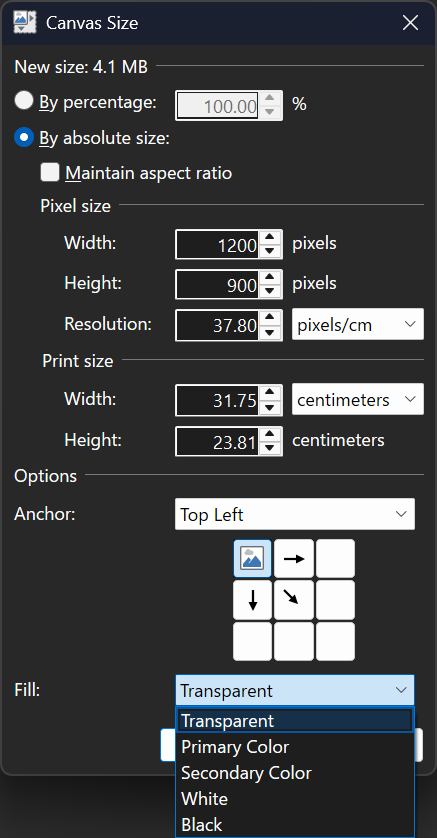
This is a small update that contains fixes for some bugs that were discovered in 5.1, as well as a new Fill option in the Image->Canvas Size dialog. It also adds back the Settings checkbox that allows for disabling overscroll.

Here’s what the updated Canvas Size dialog looks like:

image.png image.png

Change Log

Changes since 5.1:

  • Added the ability to choose the fill color when expanding the image with Image->Canvas Size
  • Fixed the ability to paste images with transparency from Firefox
  • Fixed the ability to paste certain types of images with transparency from Microsoft Office applications
  • Fixed a crash in the Levels adjustment UI due to a rounding error
  • Fixed some graphical corruption, hang, or crash issues caused by Nahimic A-Volute malware
  • Reverted the removal of the Settings checkbox that lets you disable overscroll
  • Fixed effects calling Dispose() on the IServiceProvider when they shouldn’t have been. This affected plugins like CodeLab and Plugin Browser.
  • Updated the bundled AVIF FileType to version 3.11.0.0 (thanks @null54!)

Download and Install

This build is available via the built-in updater as long as you have opted-in to pre-release updates. From within Settings -> Updates, enable “Also check for pre-release (beta) versions of paint.net” and then click on the Check Now button. You can also use the links below to download an offline installer or portable ZIP.

image.png

You can also download the installer here (for any supported CPU and OS), which is also where you can find downloads for offline installers, portable ZIPs, and deployable MSIs.

Paint.NET 5.1 Beta (build 9070)

This update fixes a few longstanding issues with copy/paste, tool shortcut keys, and tooltips in the Tools window. I’ve also changed the capitalization of “paint.net” to be “Paint.NET.”

Change Log

Changes since 5.1 beta (build 9066):

  • Fixed: Copy/Paste has been hardened against short-term intermittent errors and should no longer show spurious error dialogs (e.g. ERROR_ACCESS_DENIED) except in legitimate cases.
  • Fixed: Certain shortcut keys, especially for switching tools, will no longer stop functioning if a floating window (e.g. Tools) is hidden and then shown by clicking on the button at the top right of the main window.
  • Fixed: Tooltips in the Tools window will no longer stop functioning if a floating window (e.g. Tools) is hidden and then shown by clicking on the button at the top right of the main window.
  • Removed the “Scrolling past the edge of the image (overscroll)” checkbox from Settings. This was enabled by default, and now it is always enabled.
  • Fixed: The installer was occasionally showing an error about an InvalidGraphConfigurationException on some systems
  • Added a KnownColorSpace API for plugins so they can create IColorContexts and IDeviceColorContexts for the Display P3 and ProPhoto RGB color spaces

Download and Install

This build is available via the built-in updater as long as you have opted-in to pre-release updates. From within Settings -> Updates, enable “Also check for pre-release (beta) versions of paint.net” and then click on the Check Now button. You can also use the links below to download an offline installer or portable ZIP.

image.png

You can also download the installer here (for any supported CPU and OS), which is also where you can find downloads for offline installers, portable ZIPs, and deployable MSIs.

paint.net 5.1 beta (build 9066)

This is a hotfix that fixes a plugin, @BoltBait‘s Text Fun Factory, that was broken in the previous beta build.

Change Log

Changes since 5.1 beta (build 9064):

  • Fixed: @BoltBait‘s TextFunFactory plugin was not working on Windows 10 due to the lack of support for IDWriteFontFace6 (despite what Microsoft’s documentation states)

Download and Install

This build is available via the built-in updater as long as you have opted-in to pre-release updates. From within Settings -> Updates, enable “Also check for pre-release (beta) versions of paint.net” and then click on the Check Now button. You can also use the links below to download an offline installer or portable ZIP.

image.png

You can also download the installer here (for any supported CPU and OS), which is also where you can find downloads for offline installers, portable ZIPs, and deployable MSIs.

paint.net 5.1 beta (build 9064)

This is a hotfix for the bugs that were discovered in the previous build (5.1 beta build 9063).

Change Log

Changes since 5.1 beta (build 9063):

  • Fixed: Clicking in the color wheel was not setting the active color
  • Fixed: Retrieving an 8-bit bitmap from the clipboard with IClipboardService.TryGetImageBgra32() was not working

Download and Install

This build is available via the built-in updater as long as you have opted-in to pre-release updates. From within Settings -> Updates, enable “Also check for pre-release (beta) versions of paint.net” and then click on the Check Now button. You can also use the links below to download an offline installer or portable ZIP.

image.png

You can also download the installer here (for any supported CPU and OS), which is also where you can find downloads for offline installers, portable ZIPs, and deployable MSIs.

paint.net 5.1 beta (build 9063)

This build fixes some issues reported with the previous build, namely with pasting or loading images of certain types (e.g. 8-bit PNGs) or with certain types of color profiles (XYB/LUT). Input latency for the canvas has also been further reduced a little.

Change Log

Changes since 5.1 beta (build 9056):

  • Fixed: Right-clicking in the Colors window’s palette will now correctly set the inactive color (regression from 5.0)
  • Improved input latency further by using a dedicated per-Control thread for asynchronously calling IDXGISwapChain[1]::Present[1]() instead of using the shared threadpool. This also fixes some weirdness at startup with canvas redrawing when a lot of plugins are installed, especially if antivirus decides to do a more in-depth security scan.
  • Fixed: Could not copy 8-bit-or-less bit-depth images from Explorer into Paint.NET.
  • Fixed: Copying a 4-bit PNG from Explorer into Paint.NET would have extremely bad performance.
  • Fixed: Images with XYB LUT color profiles were not loading, or were loading incorrectly
  • Fixed: GPU effect plugins will not default to Float32 precision when using IDeviceContext.CreateImageFromBitmap(). This was otherwise resulting in inconsistent rendering output or analysis results.
  • Fixed: IImagingFactory.CreateColorTransformedBitmap() and IBitmapSource.CreateColorTransformer() are now available for plugins to make use of for color management purposes.
  • New: Plugins may now use PixelFormat.[Try]CreateDefaultColorContext(), IImagingFactory.[Try]CreateDefaultColorContext(), and IDeviceContext.[Try]CreateDefaultColorContext() extension methods. These will create the default color context (color profile) for the given PixelFormat.
  • New: Plugins may now use the PixelFormat.GetInfo() extension method to retrieve the corresponding IPixelFormatInfo object
  • New: Plugins may now implement the managed ITextRenderer interface (corresponds to the native IDWriteTextRenderer1 interface), and use it when calling ITextLayout::Draw(…)
  • New: Added ITextLayout methods Get/SetCharacterSpacing and Get/SetPairKerning
  • New: Added ITextFormat properties LastLineWrapping, OpticalAlignment, and VerticalGlyphOrientation

Download and Install

This build is available via the built-in updater as long as you have opted-in to pre-release updates. From within Settings -> Updates, enable “Also check for pre-release (beta) versions of paint.net” and then click on the Check Now button. You can also use the links below to download an offline installer or portable ZIP.

image.png

You can also download the installer here (for any supported CPU and OS), which is also where you can find downloads for offline installers, portable ZIPs, and deployable MSIs.

paint.net 5.1 beta (build 9056)

Just a few more changes and fixes before the stable release next month, including some tweaks to clipboard handling with respect to color management.

Change Log

Changes since 5.1 beta (build 9038):

  • Updated clipboard handling with respect to color management: instead of being converted to sRGB, PNGs copied to the clipboard now contain the image’s color profile. When pasting a PNG from the clipboard, the color profile is used if it’s available. For plugins using IClipboardService, there are now methods for including the color profile when copying, and obtaining the color profile when pasting.
  • Fixed Edit->Paste into New Layer and Layers->Import from File so they fill with transparent black instead of the secondary color when expanding the canvas size
  • Fixed some flickering in the toolbar when undoing certain commands
  • Slightly improved overall performance by switching to .NET 9’s System.Threading.Lock
  • Fixed a few small performance bugs with the new Direct2D Flip Mode code
  • Updated to .NET 9.0-rc2, which fixes a small visual glitch in window titlebars

Download and Install

This build is available via the built-in updater as long as you have opted-in to pre-release updates. From within Settings -> Updates, enable “Also check for pre-release (beta) versions of paint.net” and then click on the Check Now button. You can also use the links below to download an offline installer or portable ZIP.

image.png

You can also download the installer here (for any supported CPU and OS), which is also where you can find downloads for offline installers, portable ZIPs, and deployable MSIs.

paint.net 5.1 beta (build 9000)

I haven’t been updating the blog lately, partly due to … honestly I kind of just forgot about the blog (do people still read blogs? Let me know if it’s still important to you so I don’t forget again!). I kept meaning to update it for the new 5.1 pre-release builds I’ve been releasing, but life got quite busy, work was really interesting, etc. When I was away from my PC I’d often think, “oh yeah I need to update the blog,” but then I never remembered by the time I got back to my PC. Too many other things going on.

Anyway! Version 5.1 is introducing some important functionality and some amazing performance improvements, described in depth in following forum posts:

tl;dr: COLOR MANAGEMENT (support for color profiles), including support for HDR and WCG (Wide Color Gamut) displays. Performance improvements. Input latency reductions. Enormous reductions in memory usage (both CPU and GPU). New and revamped blur effects.

Please head to the forum post for the newest build (5.1 beta build 9000) for download links and information.

And like I said, if you still read this blog, please post a comment to remind me that it’s still important to you. This will help me to remember to update it in the future.

paint.net 5.0.6 is now available

This is a small update that improves the sharpness of the canvas, and fixes a few other small issues.

Get the Update

There are two releases of Paint.NET:

  • Microsoft Store release (recommended)
  • Classic Desktop release
    • Download the installer from the website . This is the recommended download if you don’t have Paint.NET installed. It can also be used to update the app.
    • If you already have it installed, you should be offered the update automatically within the next few days, but you can also get it immediately by going to ⚙ Settings -> Updates -> Check Now.
    • Offline Installers and Portable ZIPs are available over on GitHub.

Change Log

Changes since v5.0.5:

  • Improved the sharpness of the canvas, which had gotten too blurry in 5.0.4 in some cases
  • Added a “reset to default” button for Image->Resize’s Resampling option
  • Fixed a rendering artifact on the canvas where sometimes the transparency checkerboard would be visible at the bottom pixel of an image when it shouldn’t be
  • Fixed a glitch with the canvas zoom slider where it would draw the tracking thumb at the wrong position when the zoom level was at 10,000%
  • Fixed a rare hang that could happen when opening an image