Paint.NET Help: Now with Windows Live Translator

One problem that a small software developer like myself faces is getting my software and its help content available to users that don’t speak my language. Translating something like the Paint.NET Help is a daunting task — it’s a lot of content, so it either takes a lot of time, or a lot of money.

Machine Translation (MT) gets a bad rep because it usually provides laughable, hardly usable translations. It is, however, very cost effective. So, I have added the Windows Live Translator widget to the Paint.NET Help. Hopefully it can help non-English users get the gist of the help content, while at the same time adding some more feedback into the Windows Live Translator system. Who knows, maybe someday it will be almost as good as a “real” translation 🙂

If you use this, then please send feedback via the “Is this translation useful?” link at the top of the Windows Live Translator shell.

PC Club stores close … I used to work there!

So, I just saw over at HardOCP that PC Club has shut down completely. We had around 4 of them in the Seattle area (Lynnwood, Bellevue, Tacoma, and I think one more), although only the Tacoma one was still around. I actually worked there as a “sales associate” in the summer of 2002, between my junior and senior years of college. I thought it was a pretty decent place to work, although apparently things went downhill after the founder passed away (whom I met — he gave me an eBay coffee mug which I still have).


PC Club in Lynnwood, WA, circa 2002

Some [possibly] interesting bits of historical info:

· I was the top grossing sales person there during the months that I worked (summer, and during Christmas break). However, my margins were lower than the others. The cause? I’m not sure, but it’s probably because I just told the truth, or at least my honest opinion, when customers asked questions! If someone was buying a computer and couldn’t decide between an Athlon XP or a Pentium 4, and asked “What’s the difference?”, then I replied with “You probably won’t notice much, other than the $100.” Because of this I sold more systems, albeit at less profit margin. I never sold one of the $1,000 Pentium 4 2.53 GHz chips … oh well 🙂
· When games like Morrowind or Unreal Tournament 2003 came out, we sold a lot of graphics cards. The big dog at the time was the GeForce 4 Ti4600, but we sold a lot of the Ti4400’s.
· The week before I started working there, the place was actually robbed. The manager was helping a customer with some questions at the front counter, and when he turned his back for a second the customer reached over and yanked a tray of expensive Pentium 4 CPU’s. Then he ran. If it hadn’t been for this, the store would have been profitable its very first month in operation.
· One time we had a very interesting fellow walk in carrying some computer almanac. He demanded to know how the computers responded to some math problem … apparently he thought that the Pentium FDIV bug was still around.
· The manager wanted us to try and sell the LCD monitors used by the POS (point of sale) computers. Even though they were obviously used and a little dingy (from fingers, post-it notes, etc.) he refused to sell them as anything but full price and new. “They aren’t used!” Umm, yes, they were! The customers he tried to sell them to weren’t exactly impressed (nor fooled).
· We had one guy come to the story regularly just to hang out and talk. He had a job as one of those guys who stands on the sidewalk wearing a sign that says, “Carpets For Sale!”, with a big arrow. He was a mostly normal guy, not a bother or anything … apparently they actually get paid good money to do that since it’s really hard to retain them.

Paint.NET turns 4!

According to the Roadmap page, version 1.0 was released four years ago on May 6th, 2004. Happy birthday Paint.NET!

As most people know, Paint.NET started as a senior design project at Washington State University‘s EECS department. When we finished the first version, it was meant as a “hey look we actually made something – neat!” project that we showed off to family and friends. A simple website was put up on the eecs.wsu.edu web server, and the project was neither hyped nor advertised once the semester was over. Fast forward a few months later, after I started working full time at Microsoft, and I was forwarded e-mail from some interns who had managed to find it and were asking about why it wouldn’t install on XP SP2.

Interesting things to know about the first version of Paint.NET, in no particular order:

· It took 15 weeks to complete, from start to finish.
· It was about 36,000 lines of code.
· It was distributed as a raw MSI, instead of an installer/wizard EXE.
· It required Windows XP SP1 as the minimum OS. There was no support for 2000.
· And, because of a typo, it did not work in Windows XP SP2! Changing an equals operator, =, to a greater-than-or-equals operator, >=, fixed this.
· Plugins were not supported.
· We used a CVS server that was running on an XP box that doubled as one of our development workstations. It was in the EECS computer lab that other people had access to, and we had to tape a piece of paper on to it that said, “SERVER – DO NOT TURN OFF!”
· We did not have a bug tracking system. We either fixed bugs immediately as we saw them, or put them in to an Excel spreadsheet (mostly the former).
· I made the floating windows translucent after observing that most people didn’t even try drawing in the occluded areas when I handed them a tablet PC with Paint.NET on it (“hey you, draw something!”). It was if that area of the canvas didn’t exist. Once the windows were made translucent, this went away! Usability studies really do work.
· For the first month or so of development, the status bar had no information in it. Instead, it had the text: “I am the status bar!!!!!!!!!1111”

Paint.NET merchandise store is now open!

I signed up for a Cafepress account awhile ago but never got around to adding merchandise to it. This weekend, I finally uploaded all the images and set up the products:

The Official Paint.NET Merchandise store: http://www.cafepress.com/paintdotnet/
Paint.NET Merchandise Store

There are shirts, a mouse pad, mugs, stickers, buttons, hats, and a tote bag. If you have feedback on the selection, either leave a comment or join the discussion on the forum here: http://paintdotnet.forumer.com/viewtopic.php?f=12&t=24051

Over the next week I’ll add links to the store added in other places, such as the main website. For now I’ve got the link here on the blog and on the forum. Cafepress doesn’t leave much room for profit, so this is mostly a promotional tool. Which means that if your intent is to send $20 to Paint.NET then we’re both better off if you donate directly. Purchasing a $19.99 shirt via Cafepress only nets me $1 or $2. If you want a shirt, then by all means buy one – but if you want to donate, then just donate 🙂

I’m not sure why I didn’t do this two years ago, it was rather easy to set up and the response so far has been very positive.

Validating .NET/RESX translations easily with LINQ-to-XML

One of the tools I finally decided to sit down and write was a "ResXCheck" utility. RESX files hold the string resources for many .NET programs, including Paint.NET. At build time, these are compiled into a binary format and then stored in a DLL, or a RESOURCES file (Paint.NET uses the latter). The binary format is simply more efficient to access at run-time, and resgen.exe can even be used to convert between the two formats.

Essentially, a RESX is an XML files with a big list of name/value pairs. I will refer to these as string names, and string values. The XML looks like this:

<data name="GradientTool.HelpText">
  <value>Click and drag to start drawing. Holding shift constrains the angle. Right mouse button reverses colors.</value>
</data>
<data name="GradientTool.HelpText.WhileAdjusting.Format">
  <value>Offset: {0}{1} x {2}{3}, Length: {4} {5}, Angle: {6}°. Holding other mouse button will move both nubs.</value>
</data>

The RESX files for translations are in the same format and should have all the same string names. The <value> elements should have different text in them however (it should be translated!). At runtime, both the translated and original RESOURCES files are needed — the latter is used as a "fallback" in case a string is not defined in the translation. Whether this is an error is up to your translation process and resource loader code. Sometimes you want that behavior, such as if you have the base "EN" (English) translation and then some strings must vary for "EN-US" (U.S. English) or "EN-GB" (British English). You can store common string definitions in "EN", although usually it is better to completely duplicate the content, and use a tool to maintain the duplication.

Having worked with RESX files on Paint.NET and elsewhere, the following problems come up:

  1. You could use the same string name twice. The RESX compiler will simply grab one of them, either the first or the last (I can’t remember). This is a problem if you go to update a string later and you change the wrong one. Then, your changes might not show up in the main program and you won’t know why. And you’ll have a heck of a time figure it out.
  2. A translation could be missing some string names. If this happens, generally the fallback text (usually English) will show up. That is probably not the desired behavior, although in Paint.NET there are a few places where it’s okay. Translating a technical acronym for a pixel format, such as "A8R8B8G8", isn’t really necessary.
  3. A translation could have extra string names defined. This is likely to happen if strings are removed from the original RESX, but the translation hasn’t been updated yet. This will not cause any errors, it is just extra cruft that can accumulate if you don’t pay attention (most professional translation teams have tools which handle this case automatically).
  4. A string value could have "malformed" formatting tags. In the XML listed above, the second text has formatting tags such as {0} through {6}. These represent values which must be supplied at runtime by the application. There are two hazards here. One is that you could have formatting that String.Format(…) doesn’t like, such as having a { without a closing }, or vice versa. The other hazard is if a translation defines extra formatting tags, such as if a {7} was added above. Then your application will crash when it goes to apply formatting to that string. This is mostly a problem when strings have not yet been updated for a newer version. The translation may define fewer formatting tags, and this may or may not be an error. You may have a formatting tag that represents a piece of text that is not necessary to display in a particular translation.

Luckily, all of these can be checked for with some simple automation, which is what I have done with ResXCheck. I will be including its code in the next Paint.NET source code drop (for v3.30), and plan to tag it as "public domain" (just the utility, not Paint.NET itself). In the mean time, here’s a little utility function that can help you load a RESX and convert it to an IEnumerable of type KeyValuePair<string, string> (duplicate string names are not removed — this is important for being able to check #1 above).

using System;
using System.Collections.Generic;
using System.Linq;
using System.Xml.Linq;
using System.Xml.XPath;

// Given a file name for a RESX, returns a non-consolidated list of string name/value pairs.
IEnumerable<KeyValuePair<string, string>> FromResX(string resxFileName)
{
    XDocument xDoc = XDocument.Load(resxFileName);

    var query = from xe in xDoc.XPathSelectElements("/root/data")
                let attributes = xe.Attributes()
                let name = (from attribute in attributes
                            where attribute.Name.LocalName == "name"
                            select attribute.Value)
                let elements = xe.Elements()
                let value = (from element in elements
                             where element.Name.LocalName == "value"
                             select element.Value)
                select new KeyValuePair<string, string>(name.First(), value.First());

    return query;
}

To check for duplicates, a simple query such as the following is all that’s needed:

var resx = FromResX("strings.resx");

var dupeItems = resx.ToLookup(kv => kv.Key, kv => kv.Pair)      // 1
                    .Where(item => item.Take(2).Count() > 1)    // 2
                    .SelectMany(item => item.Select(val =>      // 3
                    &
#160;   
new KeyValuePair<string, string>(item.Key, val.Value));

// 1 — converts from KeyValuePair<string, string>[] to IEnumerable<IGrouping<string, string>> — essentially a list of keys, each of which has a nested list of values
// 2 — finds any key which has 2 or more values in it. the "Take(2)" is an optimization
// 3 — convert back to a list of key,value pairs (probably not necessary if you use the "T-SQL" style syntax)

You can then do a foreach() over this virtual list and print out the key,value pairs. I could have written that query using the more succinct "T-SQL" style query syntax, but I hadn’t yet learned it when I wrote that part of the code. ResXCheck was a little project I took on to force myself to learn more about LINQ. Surprisingly, it only took about 2 minutes to learn the more compact query syntax.

I’m quite happy with LINQ. It’s letting me do some powerful data manipulation with very succinct, expressive code. And it’s very simple! I’ve already found a few mistakes in my RESX files, and they will be easy to fix. This tool will also help volunteer translators who publish their translations on the forum. I know it is hard to validate these things for correctness sometimes, especially for problem #4 list above.

Oh and for fun I made the utility parallelize the processing so you can validate "N" number of translations at the same time. Sadly, on my quad-core box it only dropped the validation time from 560 milliseconds down to 300. If I only have 50 more translations, then I could really stress it! 🙂

A simple C# / LINQ trick shown with Console.ReadLine()

I haven’t been working on Paint.NET v4.0 at all lately, but I have been reading, learning, and prototyping about a whole sleuth of things related to functional and asynchronous programming. One such topic is that of monads, which I have a blog entry almost completed on. However, I wanted to get a quick blog post to show something simple yet powerful. LINQ brings a lot of power to IEnumerable<T>, and in this case we’re going to map the console input into an IEnumerable<T>. Then we’ll use standard LINQ methods to only display those lines of text that have ".dll" in them. It’s a contrived example, but it’s easy enough to find more useful applications of this. I have to go in a minute, so I’ll throw this code up on the blog and let the conversation be driven from the comments.

public static class Extensions
{
    public static IEnumerable<T> ToList<T>(this Func<T> sampleFn)
    {
        while (true)
        {
            T val = sampleFn();
            yield val;
        }
    }

    public static IEnumerable<T> While<T>(this IEnumerable<T> list, Func<T, bool> whileFn)
    {
        foreach (T item in list)
        {
            if (whileFn(item))
                yield return item;
            else
                yield break;
        }
    }

    public static void Execute<T>(this IEnumerable<T> list)
    {
        foreach (T item in list) { }
    }

    public static IEnumerable<T> Do<T>(this IEnumerable<T> list, Action<T> action)
    {
        foreach (T item in list)
        {
            action(item);
            yield item;
        }
    }
}

class Program
{
    public static void Main()
    {
        Func<string> inputSampleFn = Console.ReadLine;

        var input = inputSampleFn.ToList()
                                 .While(s => s != null);

        var query = input.Select(s => s.ToLower())
                         .Where(s => s.Contains(".dll"));

        query.Do(s => Console.WriteLine(s))
             .Execute();
    }
}

Now, compile this to something like "dllFilter.exe". Then run, at the command line, "dir c:\windows | filter.exe". Neat 🙂

Paint.NET just can’t satisfy an 8-core Opteron

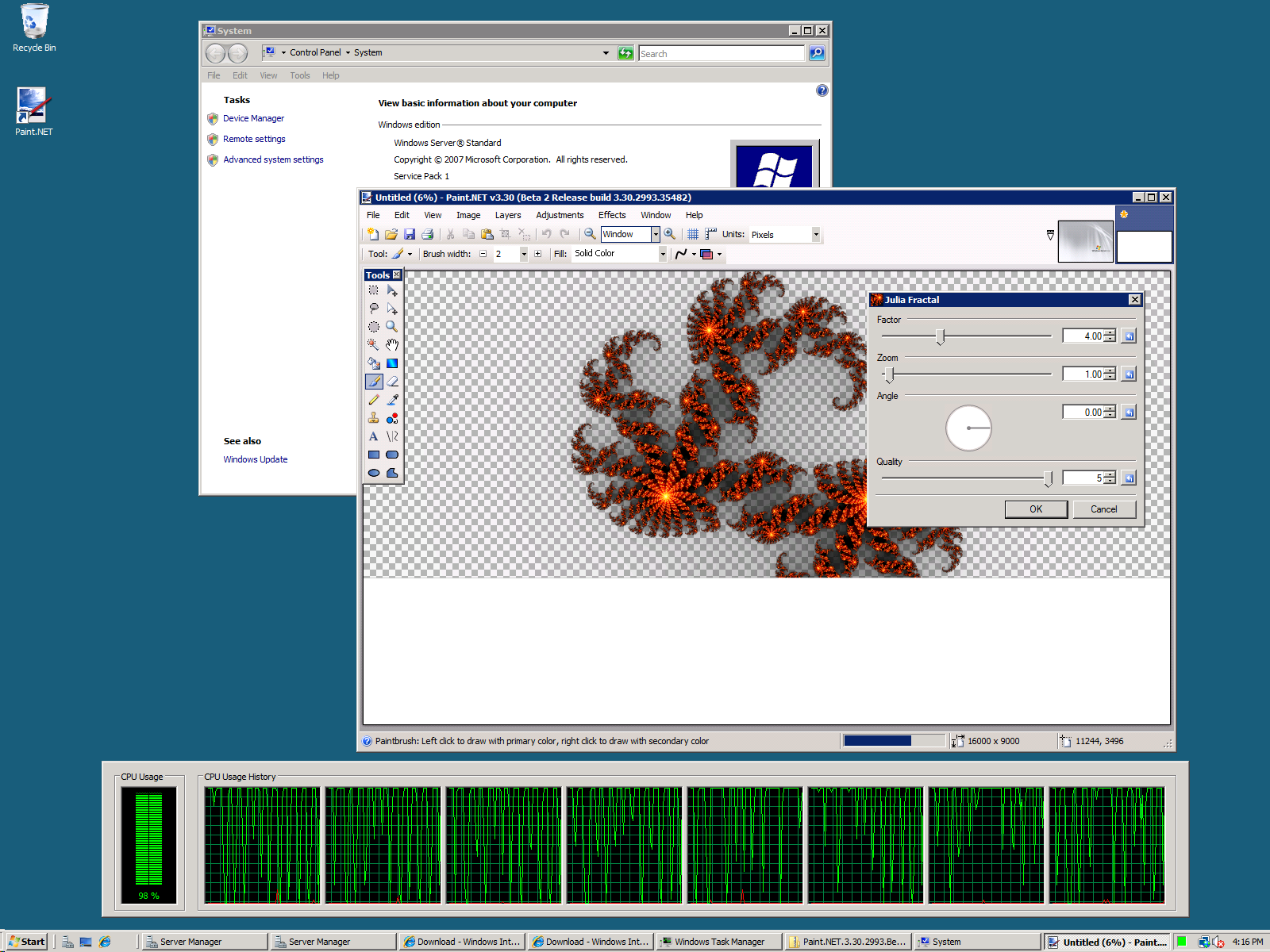
Just to make sure, I went and downloaded the trial version of Windows Server 2008 from the Microsoft website. I installed it on this 8-core Opteron workstation with 8 GB of RAM that AMD sent me awhile ago for doing multithreading and performance scaling stuff. I installed version 3.22, then updated it to 3.30 Beta 2 to make sure that would work, and sure enough it does!


(click for full size, 1600×1200)

I’m not surprised, but I felt the need to verify this anyway 🙂 I’ll make sure the website lists Windows Server 2008 as a supported OS on the next update.

As an interesting side note, having access to systems with 4 and 8 cores has brought up an interesting performance problem in Paint.NET, and key insights for optimization and design going forward. In the past I have done a lot of work to ensure that certain key rendering code is multithreaded, and as such going from dual- to quad- to octa-core has yielded healthy performance gains. Even on these systems, quite often, I just can’t get CPU usage all the way up to 100%! Just look at the screenshot above: even on a very compute-intensive effect such as Julia Fractal, at highest quality, on a 16,000 x 9,000 pixel canvas (yes that’s 144 megapixels), the CPU usage is bouncing around and clearly not anywhere close to full performance. I guess the silver lining here is that power consumption is a little lower as a result, eh?

Even on my personal quad core desktop, I’m lucky if rendering a large gradient can hit 65% CPU usage. There’s a lot of wasted performance by having the rendering pipeline set up the way it us. Hopefully my talks with the .NET Parallels Extensions team will help me to improve this situation, while also putting some extra “real world” code in their laps to play with. With the current design, I wouldn’t be surprised if Paint.NET could barely keep a 64-core system more than 15% busy.

Also, I’d like to point out another exciting project related to things like concurrency and parallelism: Microsoft Live Labs Volta. I had a meeting with them last Tuesday and their approach to asynchronous, stream/event-based programming just blew my mind. Their project as a whole is actually targeted for some kind of simplified web cloud tier-distributed development*, but they have a concurrency runtime which could prove extremely valuable for the two rich client/desktop applications that I currently work on**. I’m very excited – anytime somebody sends me a meeting request titled, “Discuss monads and composition in the context of asynchronous computations,” I am reassured that there are still smart people out there working on cool things. I’m not sure how much I can discuss publicly about their stuff, but once I get any kind of green light I’m sure I’ll start gushing. I’ll leave you with one quote from the discussion that I actually made sure to write down, as it embodies something I’ve been struggling and searching for with respect to this type of coding:

“By construction, these things are correct.”

More on what that actually means later. I’ve got a lot of thoughts on parallel/asynchronous, concurrent, and functional programming and how it relates to multithreading, correctness, and performance. Hopefully I can put some of that into writing!

* This is not an exact definition 🙂
** That would be 1) Paint.NET, and 2) the other one that I work on at Microsoft (“my day job”).

Thoughts on Component Isolation for Paint.NET v4.0

I’ve been doing a lot of thinking about how Paint.NET needs to change or evolve before it hits version 4.0, and the big thing that keeps coming up is isolation. Right now, the control flow and error handling in Paint.NET lets one component crash or corrupt the whole program. This could be code sitting in a plugin that causes an unhandled exception in a way that my try/catch harnesses don’t handle, or it could be a COM component loaded by Windows common file Open/Save dialogs that crashes or locks up. Or maybe a piece of code doesn’t throw an exception but it does corrupt some other data, and then that corruption causes a crash later. And then that gets attributed to the wrong component. GDI+ seems to like doing that a lot.

Not only does Paint.NET need to be protected by crashing or "bad" plugins, but it needs to be protected from itself! Things like the Open/Save and Print dialogs are a good example, especially because they deal with external, "native" components. Some people have shell extensions installed that cause the Open/Save dialogs to fail, hang, or crash, and this breaks Paint.NET! This could be something as seemingly benign as a thumbnail provider for DivX videos. Yes, I get crash reports on the forum for that every so once in awhile. Why should Paint.NET have to crash if there’s a corrupted DivX video in a folder you’ve navigated to via File->Open? I’d rather crash just the Open dialog, detect the error without corruption in the main process, and then re-run the dialog in some kind of compatibility or reduced functionality mode. At least that way if it corrupts memory, then that corruption only affects the hosting process that it lives in.

So, there needs to be a really easy way for me to write a component in Paint.NET — whether it’s "built-in" or a "plug-in" — that can be isolated and not cause problems for the rest of the application. This means I want to host it in an external process and communicate with it, and then have a layer of abstraction in place for creating a "remote", isolated object.

The new System.AddIn namespace in .NET 3.5 provides a whole system for this, but honestly I find it to be way too complex, confusing, and involved. They have host views, add-in views, host-side adapter, add-in side adapters, etc. It’s a bunch of terminology that seems invented — why not just say client and server, proxy, tear-off, etc.? Every time you add a new interface or type you have to add code that spans at least 3 assemblies. Plus, they do not provide the ability for me to be running in a 64-bit process and have it communicate with an add-in that requires 32-bit hosting. This is important for certain plug-ins which are doing native interop to DLL’s that are only available in 32-bit (the VTF File Type Plugin comes to mind). They also do not provide the ability to activate an add-in that needs to run at a higher security level — for instance, if I want to require my Settings dialog to run with administrator privilege. I don’t want to have to deal with UAC at the code level, and would prefer it to be abstracted away. They also enforce a specific directory structure, and so on … anyway, it’s just too much and also too little.

.NET Remoting isn’t really an end-to-end solution for what I need, as it does not provide a hosting process. COM provides component hosting in an external process, but it seems like major overkill to register my .NET components as COM-proxied objects. Windows Communication Foundation is more for "enterprise" remoting and communication scenarios.

So it looks like I may have to roll my own solution, using System.IO.Pipes (actually I may prefer an HWND and WM_COPYDATA for marshaling) and borrowing heavily from the lessons put forth by System.AddIn (they have a very good story for versioning), and learned from my inbox full of crash logs. In any case it must be something that is easy to use by both the "host" and the "add-in" (or "built-in" :)). I’m thinking code generation will be very handy here in order to be able to declare an isolatable interface and then auto-generate the local tear-off/proxy, client stub, server stub, and registration glue.

Paint.NET forum is down … again :(

(D’oh — right before I hit "publish" on this post, the forums sprang back up)

I’m not sure what’s going on at Forumer lately, but it seems like the Paint.NET forums (not that the link works right now, mind you) have been up and down chaotically for the last few weeks. In fact, all of forumer.com is non-responsive, so I can’t even leave a troubleshooting ticket on their forum. This has been an ongoing problem lately, unfortunately. There was a time in January (if I remember right) where it was down for probably a full week. When this happens my inbox starts filling up with e-mails telling me about it and asking when things will be fixed. Unfortunately, it’s out of my control so there’s really nothing I can tell people.

I’ve actually been thinking about moving the forums for some time, so that I can host it myself. Problem is, the amount of time involved would be a lot, right? The thing would need a dedicated server and the ability to handle up to 200 users simultaneously (average right now is 30-50, so 200 gives room to grow). I wouldn’t be so worried about disk space (storage is practically free nowadays), but the CPU time needed would probably be high and keep increasing as more and more users joined. Then there’s the logistics of either migrating or deciding not to migrate things like the user database and content. Since Forumer has a policy of only giving you the database if they’re deleting your forum, it’d basically be a complete do-over.

The obvious benefits of self-hosting the forum are the ability to capture that incremental revenue boost by enabling AdSense and Kontera (maybe only for guest users though), and the ability to completely customize all forum elements. On the down side, I’d have full responsibility for the forum’s down time. I don’t know Unix very well so I’d probably run phpBB on a Windows server. Financially it makes sense, as the hosting costs would easily be covered by AdSense and Kontera. It’s the time thing that has kept me from pursuing this in the past. All this sporadic downtime is chipping away at my patience, however, and slowly changing my mind.

Anyway, thoughts on self-hosting the forum? (Please do not give me suggestions for other free forum host sites like Forumer, that’s not what I’m asking for.)

Cleaning up the UI for Paint.NET v3.30

While I was adding the color wheel control for IndirectUI, I decided that now was as good of a time as any to incorporate some other feedback from some of the more prominent plugin authors. Ed Harvey had suggested that the UI could be made more compact, as adding a bunch of properties often created a dialog that was large or spread out. BoltBait and pyrochild wanted the ability to change the text in the title of the dialog – perhaps to add a “version 2” tag or something similar. The rendering quality of the preview/thumbnail image in some of the dialogs was also a bit of a thorn in my side.

So, I’ve managed to address all of these, and a few others. The end result is a visually refreshed UI that is cleaner and less “noisy”. I think the difference is best seen by showing pyrochild’s Film effect plugin, before and after:

(Unfortunately I had to resize these to 65% of original size, otherwise my WordPress provider was complaining about the image sizes or something…)

At first glance it may not seem like much, but I think overall it results in a much more favorable user experience. The “tick marks” on the sliders are not shown by default (plugin authors may still enable them if they want though), and the dialog ends up being less spread out. The reset button is more subtle, favoring a small graphic instead of text. I may need to push it out another pixel or two so that it doesn’t accidentally get clicked instead of the up/down buttons. Or maybe I’ll move it to the left side of the text boxes. The thumbnail is also smoother, as it is using bicubic instead of bilinear resampling (although you can’t tell with the resized screenshots). For me, all this results in a less “noisy” dialog and it is much nicer to use.

And the great thing about IndirectUI is that all plugins written to use it will automatically get these benefits! 🙂 Hopefully this will help Paint.NET v3.30 further distance itself from being “a cowbell release“.