Paint.NET 5.1.5 Beta (build 9191)

This update adds JPEG XL (*.jxl) support, improves quantization color quality, updates AVIF loading to better handle mapping HDR images to SDR, and fixes some bugs.

Change Log

Changes since 5.1.4:

  • New: JPEG XL (*.jxl) images are now supported by way of bundling @null54‘s JpegXLFileType plugin
  • Fixed the Levels adjustment not honoring the active selection.
  • Fixed some more mouse cursor issues when completing certain actions with certain tools.
  • Fixed some keyboard shortcuts in the Adjustments menu not working reliably.
  • Fixed most cases of tooltips blinking on/off when drawn near the bottom of the screen (thanks @toe_head2001!).
  • Fixed some new high-DPI scaling issues in toolbar dropdowns.
  • Improved quantization quality for Effects->Color-Quantize and when saving an image at 8-bit depth and below. This was done by merging octree node colors in linear gamma space.
  • Fixed some incorrect background text color rendering in the status bar.
  • Updated the bundled AvifFileType plugin to v3.12.0, which improves conversion from HDR images utilizing the Rec. 2020 PQ color space (thanks @null54!).
  • Updated the bundled WebpFileType plugin to v1.5.0 (thanks @null54!).

Download and Install

This build is available via the built-in updater as long as you have opted-in to pre-release updates. From within Settings -> Updates, enable “Also check for pre-release (beta) versions of paint.net” and then click on the Check Now button. You can also use the links below to download an offline installer or portable ZIP.

image.png

You can also download the installer here (for any supported CPU and OS), which is also where you can find downloads for offline installers, portable ZIPs, and deployable MSIs.

Paint.NET 5.1.4 is now available

This update is mostly a hotfix that fixes installation on Windows Server systems.

Get the Update

There are two releases of Paint.NET:

  • Microsoft Store release (recommended)
    • You can purchase it here. This helps fund development and is an alternative or supplement to sending in a donation. In addition, updates happen automatically in the background when you’re not using the app.
    • If you already have it installed, the update should happen automatically once Microsoft certifies the update, usually within the next day or so. To get the update immediately (once it’s certified), you can follow the instructions listed here.
  • Classic Desktop release
    • Download the installer from the website. This is the recommended download if you don’t have Paint.NET installed. It can also be used to update the app.
    • If you already have it installed, you should be offered the update automatically within the next few days, but you can also get it immediately by going to ⚙ Settings -> Updates -> Check Now.
    • Offline Installers and Portable ZIPs are available over on GitHub.

Change Log

Changes since 5.1.3:

  • Fixed: Installation on Windows Server will no longer fail with an error about a missing srclient DLL.
  • Improved: When saving an image fails due to Windows Defender’s “Controlled Folder Access” setting, the error message will mention that instead of being a generic “I/O failure” message.
  • New: GIF Comment metadata is now preserved. It maps to EXIF Photo.UserComment tags.
  • Improved: Consolidated the number of threads used for Async Present from 3 per image (canvas, left ruler, top ruler) to 3 total.
  • Improved: ColorManagementEffect now supports DxgiColorSpace color contexts (for plugin developers).

    Paint.NET 5.1.3 Beta (build 9168)

    This is a maintenance release with a big heaping of performance improvements, bug fixes, and other small changes.

    Change Log

    Changes since 5.1.2:

    • Fixed: Some PNG metadata from text chunks is now preserved (Author, Comment, Copyright, and Description).
    • Fixed some issues with snapping tool window when there are multiple monitors with different scaling levels. Sometimes the snapping boundaries would be calculated in the wrong coordinate space and cause snapping to happen at seemingly arbitrary (and weird) locations.
    • Fixed an off-by-1 error in the Median Blur effect that was producing incorrect results, especially with radius=1
    • Fixed a crash in the Levels adjustment’s UI due to some improper value clamping.
    • Fixed the Red Eye Removal effect so it no longer crashes if the canvas zoom level does not show the whole image.
    • Fixed the Red Eye Removal effect so that it properly clips to the active selection.
    • Fixed: View -> Zoom to Selection no longer adjusts the zoom level slightly if used twice in a row.
    • Improved: The Color properties for the Clouds effect now have Reset buttons, which will reset them to the current Primary and Secondary colors.
    • Fixed some issues with the mouse cursor briefly being a generic arrow instead of the tool’s requested cursor.
    • Fixed: The installer will no longer silently die on Windows 10 pre-v21H2. It will now correctly show an error message stating that Windows 10 v21H2 is required, and the exit code will be ERROR_OLD_WIN_VERSION.
    • Improved framerate and responsiveness of the canvas when using CPU- or GPU-intensive tools such as Move Selected Pixels
    • Substantially improved UI responsiveness when modifying a complex selection with a combine mode other than Replace
    • Fixed: Tooltips now respect dark mode (thanks @toe_head2001!)
    • Fixed: The Text tool’s “Sharp (Modern)” rendering mode has been reverted to use Natural Symmetric rendering instead of Natural Symmetric Downsampled. (See discussion here. cc @Leahsarah)
    • Reduced the performance cost of the circle “preview cursor” that all of the brush tools use.
    • New: HlslUnaryFunctionEffect (for GPU effect plugin developers) now has FrexpMantissaPortion, FrexpExponentPortion, ModfIntegerPortion, and ModfFractionalPortion. These provide access to the Frexp and Modf HLSL instructions.
    • New: Plugins may now implement custom DirectWrite IInlineObjects.
    • New: IEffectConfigForm.Close() is now public, and may be used by plugins that are hosting other effects via IEffectsService2.
    • New: Added an accelerator key for Image -> Rotate 90° Counter-clockwise.
    • New: Added accelerator keys to the View menu for the Inches, Centimeters, and Pixels choices.
    • Changed to use the Windows threadpool instead of the .NET portable threadpool.

    Download and Install

    This build is available via the built-in updater as long as you have opted-in to pre-release updates. From within Settings -> Updates, enable “Also check for pre-release (beta) versions of paint.net” and then click on the Check Now button. You can also use the links below to download an offline installer or portable ZIP.

    image.png

    You can also download the installer here (for any supported CPU and OS), which is also where you can find downloads for offline installers, portable ZIPs, and deployable MSIs.

    Paint.NET 5.1.2 is now available

    This update fixes some small bugs, including flickering issues with NVIDIA Fast VSync, and should further soothe the screen blanking issues being reported on some systems with buggy MPO (multiplane overlay) support.

    Get the Update

    There are two releases of Paint.NET:

    • Microsoft Store release (recommended)
      • You can purchase it here. This helps fund development and is an alternative or supplement to sending in a donation. In addition, updates happen automatically in the background when you’re not using the app.
      • If you already have it installed, the update should happen automatically once Microsoft certifies the update, usually within the next day or so. To get the update immediately (once it’s certified), you can follow the instructions listed here.
    • Classic Desktop release
      • Download the installer from the website. This is the recommended download if you don’t have Paint.NET installed. It can also be used to update the app.
      • If you already have it installed, you should be offered the update automatically within the next few days, but you can also get it immediately by going to ⚙ Settings -> Updates -> Check Now.
      • Offline Installers and Portable ZIPs are available over on GitHub.

    Change Log

    Changes since 5.1.1:

    • Improved (reduced) CPU and GPU usage of the canvas, which leaves more CPU time for things like input processing. This was done by enabling VSync while also utilizing the DXGI Frame Latency Waitable Handle to minimize latency.
    • Fixed some screen blanking issues for some systems that have buggy MPO (multiplane overlay) support.
    • Fixed flickering and mouse trails for systems that have NVIDIA Fast VSync enabled (NVIDIA driver bug).
    • Fixed a hang while making changes to the Transparency Checkerboard Brightness setting when certain legacy plugins are installed.
    • Fixed a crash in the Levels adjustment UI if it was canceled or closed too quickly.
    • Added a /diagnostics command-line parameter that shows the diagnostics info without having to start up the whole app.
    • Added convenience constructors to most of Direct2D’s built-in effects (for GPU effect plugin authors).
    • Added a PrimitiveBlendEffect for GPU effect plugins. This wraps ID2D1BlendTransform which is normally only available for use within the transform graph of a custom effect.
    • Added ability for plugins to work with CMYK (PixelFormats.Cmyk32/64 and ColorCmyk32/64 structs)
    • Updated the DDS FileType Plus plugin to v1.12.12.0 (thanks @null54!)

    Paint.NET 5.1.2 Beta (build 9118)

    This update fixes some bugs across the app and should further soothe the screen blanking and visual artifacts on systems with buggy MPO (multiplane overlay) support.

    Change Log

    Changes since 5.1.1:

    • Improved (reduced) CPU and GPU usage of the canvas, which leaves more CPU time for things like input processing. This was done by enabling VSync while also utilizing the DXGI Frame Latency Waitable Handle to minimize latency.
    • Fixed some visual issues, such as screen blanking and flickering, for some systems that have buggy MPO (multiplane overlay) support.
    • Fixed a hang while making changes to the Transparency Checkerboard Brightness setting when certain legacy plugins are installed.
    • Fixed a crash in the Levels adjustment UI if it was canceled or closed too quickly.
    • Added a /diagnostics command-line parameter that shows the diagnostics info without having to start up the whole app.
    • Added convenience constructors to most of Direct2D’s built-in effects (for GPU effect plugin authors).
    • Added a PrimitiveBlendEffect for GPU effect plugins. This wraps ID2D1BlendTransform which is normally only available for use within the transform graph of a custom effect.
    • Added ability for plugins to work with CMYK (PixelFormats.Cmyk32/64 and ColorCmyk32/64 structs)
    • Updated the DDS FileType Plus plugin to v1.12.12.0 (thanks @null54!)

    Download and Install

    This build is available via the built-in updater as long as you have opted-in to pre-release updates. From within Settings -> Updates, enable “Also check for pre-release (beta) versions of paint.net” and then click on the Check Now button. You can also use the links below to download an offline installer or portable ZIP.

    image.png

    You can also download the installer here (for any supported CPU and OS), which is also where you can find downloads for offline installers, portable ZIPs, and deployable MSIs.

    Paint.NET 5.1.1 is now available

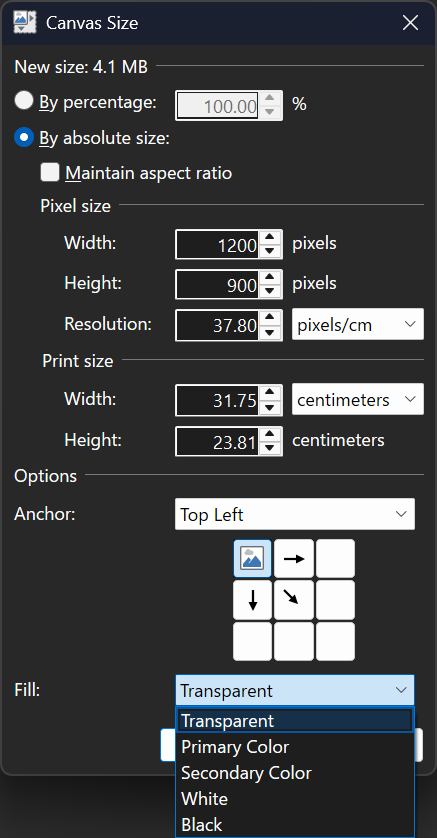
    This is a small update that contains fixes for some bugs and that were discovered in 5.1, as well as a new Fill option in the Image -> Canvas Size dialog. It also has workarounds for some bugs in Sentinel One (antivirus) that were causing crashes in the installer and hangs during app startup.

    Get the Update

    There are two releases of Paint.NET:

    • Microsoft Store release (recommended)
      • You can purchase it here. This helps fund development and is an alternative or supplement to sending in a donation. In addition, updates happen automatically in the background when you’re not using the app.
      • If you already have it installed, the update should happen automatically once Microsoft certifies the update, usually within the next day or so. To get the update immediately (once it’s certified), you can follow the instructions listed here.
    • Classic Desktop release
      • Download the installer from the website. This is the recommended download if you don’t have Paint.NET installed. It can also be used to update the app.
      • If you already have it installed, you should be offered the update automatically within the next few days, but you can also get it immediately by going to ⚙ Settings -> Updates -> Check Now.
      • Offline Installers and Portable ZIPs are available over on GitHub.

    Change Log

    Changes since 5.1:

    • Added the ability to choose the fill color when expanding the image with Image->Canvas Size
    • Fixed the ability to paste images with transparency from Firefox
    • Fixed the ability to paste certain types of images with transparency from Microsoft Office applications
    • Changed Edit->Cut and Edit->Crop to Selection to completely zero out pixels outside of the selected area, which could otherwise be a privacy issue.
    • Fixed the inability to load an image with a bad ICC color profile. The color profile will now be ignored and the image will be treated as if it had an sRGB color profile.
    • Fixed the titlebar text being drawn in the active text color when the window is not active when using Light or Blue themes
    • Reverted the removal of the Settings checkbox that lets you disable overscroll
    • Fixed a crash in the Levels adjustment UI due to a rounding error
    • Fixed a race condition in resource loading that sometimes caused the zoom level in the status bar to display as “ScaleFactor.Percentage.Format”
    • Fixed some graphical corruption, hang, or crash issues caused by Nahimic A-Volute malware
    • Worked around a crash (“0xc000007b”) in the installer caused by Sentinel One antivirus.
    • Worked around a hang at app startup if Sentinel One antivirus.
    • Fixed many cases of screen blanking, rendering glitches, and crashes on systems with certain NVIDIA GeForce GPUs, and certain displays with support for overlays and/or VRR (FreeSync, GSYNC). This appears to be a bug in NVIDIA’s driver.
    • Fixed effects calling Dispose() on the IServiceProvider when they shouldn’t have been. This affected plugins like CodeLab and Plugin Browser.
    • Updated the bundled AVIF FileType to version 3.11.0.0 (thanks @null54!)

    Paint.NET 5.1.1 Beta (build 9103)

    This fix will hopefully further soothe the issues some have been reporting with blanking screens and GPU crashes.

    After a multi-day investigation involving performance profiling and discussions with some subject matter experts (DirectX Discord Server), I believe what’s happening is a result of multi-plane outputs (MPOs, aka overlays) intersecting with VRR (variable refresh rate, FreeSync, GSYNC) and PDN’s use of multiple on-screen flip-model swapchains. Each swapchain was rendering unthrottled, and they were not synchronized.

    The solution, I’m hoping, is that I’ve applied VSync to everything except the canvas. Only the canvas is latency sensitive enough to warrant using an unthrottled framerate (akin to NVIDIA’s “Fast VSync”).

    The screen blanking issue appears to be a bug in NVIDIA’s GPU driver, but may also be a bug in the firmware of some displays. I have not yet been able to test this on an AMD GPU to see if it happens there, but I’m planning to do that next.

    Change Log

    Changes since 5.1.1 Beta (build 9102):

    • Improved (hopefully fixed) the screen blanking issue that is happening mostly on systems with NVIDIA GeForce GPUs on displays with high refresh rates and/or VRR support (GSYNC/FreeSync)

    Download and Install

    This build is available via the built-in updater as long as you have opted-in to pre-release updates. From within Settings -> Updates, enable “Also check for pre-release (beta) versions of paint.net” and then click on the Check Now button. You can also use the links below to download an offline installer or portable ZIP.

    image.png

    You can also download the installer here (for any supported CPU and OS), which is also where you can find downloads for offline installers, portable ZIPs, and deployable MSIs.

    Paint.NET 5.1.1 Beta (build 9102)

    This beta build has some more fixes, particularly for systems with NVIDIA GSYNC enabled.

    Change Log

    Changes since 5.1.1 Beta (build 9098):

    • Fixed Edit->Cut and Edit->Crop to Selection not zeroing out transparent pixels, which could be a privacy issue.
    • Fixed swapchain valid rect propagation, which may fix some cases of flickering or trails that have been reported.
    • Fixed some crashes and blanking screen issues related to GSYNC/FreeSync/VRR on some NVIDIA GPUs. The NVAPI profile was not being created which caused VRR to still be active for the app. This also appears to be a bug in NVIDIA’s GPU driver.

    Download and Install

    This build is available via the built-in updater as long as you have opted-in to pre-release updates. From within Settings -> Updates, enable “Also check for pre-release (beta) versions of paint.net” and then click on the Check Now button. You can also use the links below to download an offline installer or portable ZIP.

    image.png

    You can also download the installer here (for any supported CPU and OS), which is also where you can find downloads for offline installers, portable ZIPs, and deployable MSIs.

    Paint.NET 5.1.1 Beta (build 9098)

    NOTE: I forgot to post 5.1.1 Beta (build 9093) to the blog. See the forum post here for information about the fixes in that build.

    This beta build has some more fixes, particular in the way of workarounds for the crash and hang on systems with Sentinel One antivirus.

    Change Log

    Changes since 5.1.1 Beta (build 9093):

    • Fixed the inability to load an image with a bad ICC color profile. The color profile will now be ignored and the image will be treated as if it had an sRGB color profile.
    • Fixed the crash in the “anycpu” installer if Sentinel One is installed (“0xc000007b”).
    • Fixed the hang at app startup if Sentinel One is installed. If S1 is detected then Async Present will be disabled, which negatively affects input latency/lag (it won’t be worse than PDN 5.0). This is temporary until Sentinel One itself is fixed.
    • Fixed (maybe/hopefully) some rendering glitches on some systems. Symptoms include mouse trails and a flickering canvas. This was done by disabling swapchain valid rect propagation, which did not seem to be working anyway. The /disableSwapChainValidRectPropagation command-line parameter has been removed as a result.
    • Added the /disableSwapChainPresent1 command-line parameter for troubleshooting purposes (will be removed in a future version).

    Download and Install

    This build is available via the built-in updater as long as you have opted-in to pre-release updates. From within Settings -> Updates, enable “Also check for pre-release (beta) versions of paint.net” and then click on the Check Now button. You can also use the links below to download an offline installer or portable ZIP.

    image.png

    You can also download the installer here (for any supported CPU and OS), which is also where you can find downloads for offline installers, portable ZIPs, and deployable MSIs.

    Paint.NET 5.1.1 Beta (build 9087)

    This is a small update that contains fixes for some bugs that were discovered in 5.1, as well as a new Fill option in the Image->Canvas Size dialog. It also adds back the Settings checkbox that allows for disabling overscroll.

    Here’s what the updated Canvas Size dialog looks like:

    image.png image.png

    Change Log

    Changes since 5.1:

    • Added the ability to choose the fill color when expanding the image with Image->Canvas Size
    • Fixed the ability to paste images with transparency from Firefox
    • Fixed the ability to paste certain types of images with transparency from Microsoft Office applications
    • Fixed a crash in the Levels adjustment UI due to a rounding error
    • Fixed some graphical corruption, hang, or crash issues caused by Nahimic A-Volute malware
    • Reverted the removal of the Settings checkbox that lets you disable overscroll
    • Fixed effects calling Dispose() on the IServiceProvider when they shouldn’t have been. This affected plugins like CodeLab and Plugin Browser.
    • Updated the bundled AVIF FileType to version 3.11.0.0 (thanks @null54!)

    Download and Install

    This build is available via the built-in updater as long as you have opted-in to pre-release updates. From within Settings -> Updates, enable “Also check for pre-release (beta) versions of paint.net” and then click on the Check Now button. You can also use the links below to download an offline installer or portable ZIP.

    image.png

    You can also download the installer here (for any supported CPU and OS), which is also where you can find downloads for offline installers, portable ZIPs, and deployable MSIs.