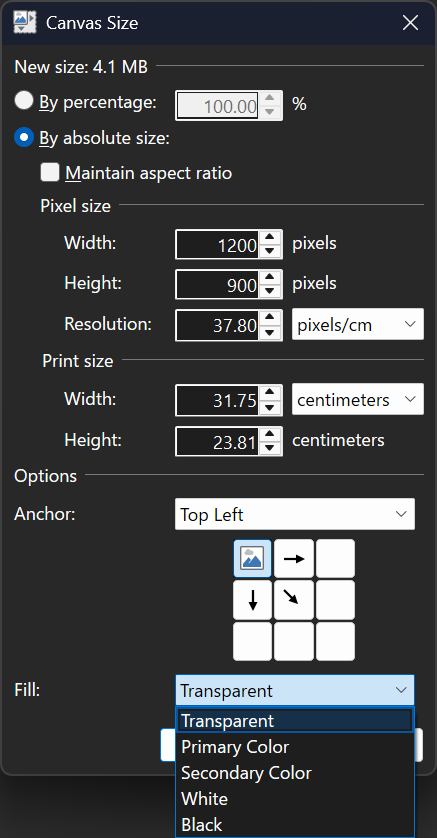
This is a small update that contains fixes for some bugs that were discovered in 5.1, as well as a new Fill option in the Image->Canvas Size dialog. It also adds back the Settings checkbox that allows for disabling overscroll.
Here’s what the updated Canvas Size dialog looks like:

Change Log
Changes since 5.1:
- Added the ability to choose the fill color when expanding the image with Image->Canvas Size
- Fixed the ability to paste images with transparency from Firefox
- Fixed the ability to paste certain types of images with transparency from Microsoft Office applications
- Fixed a crash in the Levels adjustment UI due to a rounding error
- Fixed some graphical corruption, hang, or crash issues caused by Nahimic A-Volute malware
- Reverted the removal of the Settings checkbox that lets you disable overscroll
- Fixed effects calling Dispose() on the IServiceProvider when they shouldn’t have been. This affected plugins like CodeLab and Plugin Browser.
- Updated the bundled AVIF FileType to version 3.11.0.0 (thanks @null54!)
Download and Install
This build is available via the built-in updater as long as you have opted-in to pre-release updates. From within Settings -> Updates, enable “Also check for pre-release (beta) versions of paint.net” and then click on the Check Now button. You can also use the links below to download an offline installer or portable ZIP.

You can also download the installer here (for any supported CPU and OS), which is also where you can find downloads for offline installers, portable ZIPs, and deployable MSIs.
 Paint.NET Blog